An AI assistant like Claude Code is very capable working on your project: it reads the files, writes code, runs commands. But out of the box, it lives locked inside your computer. It can't see the tasks in your project manager, can't query your database, doesn't know which errors are firing in production and can't open a browser to check how your website looks. All of that needs a bridge. That bridge has a name: MCP, the Model Context Protocol. In this article we explain what it is, how to use it in Claude Code and which connections are worth it for a digital business.
What MCP is and why it exists
MCP (Model Context Protocol) is an open standard that defines how an AI assistant connects to external tools and data. It was created by Anthropic —the company behind Claude— at the end of 2024, and since then much of the industry has adopted it, including OpenAI and Google; today it's developed as an open project under the umbrella of the Linux Foundation, the same neutral organisation that shelters projects like Linux and Kubernetes. In practice, it's the standard way to give an assistant "hands".
The analogy that explains it best is USB-C. Before it existed, every device came with its own charger and cable, incompatible with each other. The same was happening with AI: connecting an assistant to your calendar, your database or your CRM required a custom integration for each assistant-tool pair. It's what the industry calls the M×N problem: with M assistants and N tools you have to build —and maintain— M×N different connectors. MCP removes it at the root: the tool connects once, with a common protocol, and any compatible assistant can use it. The ecosystem's scale shows the size of the shift: barely a year and a half after launch there are already thousands of public MCP servers, between vendors' official ones and community projects.
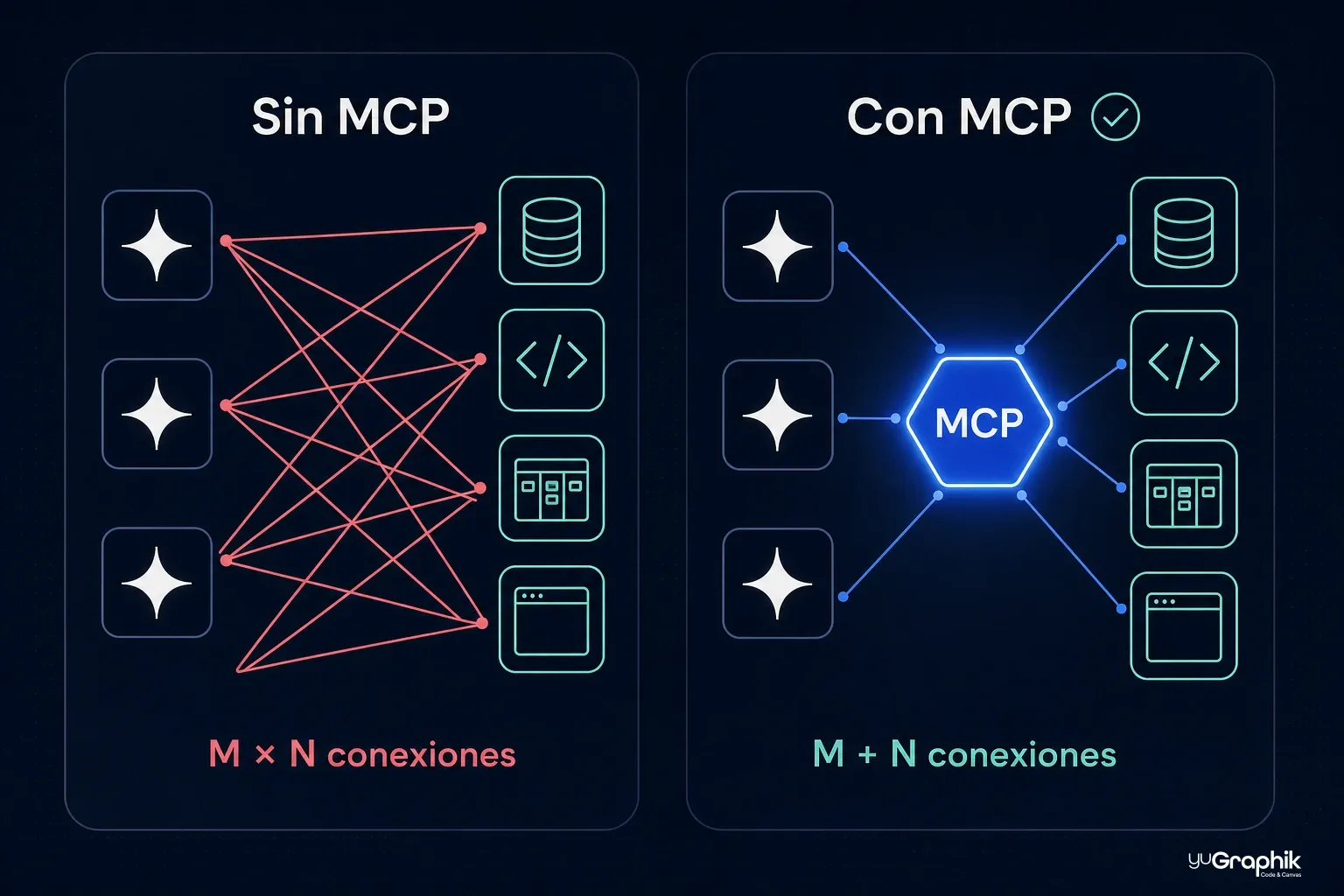
There are two pieces:
- MCP servers. Small programs that "wrap" a tool or service and expose its capabilities in the protocol's language: search Notion, create a GitHub issue, query this database. They're published by the vendors themselves (Notion, GitHub, Sentry…) or by the community.
- MCP clients. The assistants that consume those capabilities. Claude Code is one; so are the Claude app, other AI code editors and custom agents.
And a server doesn't just expose actions. The protocol distinguishes three kinds of capabilities: tools (actions the assistant can execute, like creating a task or running a query), resources (read-only information it can consult, like a database schema or an internal manual) and prompts (predefined work templates that standardise how to approach a specific task).
When Claude Code connects to an MCP server, it automatically discovers what that server can do and decides when to use it. You don't invoke anything by hand: you ask in natural language —"what tasks do I have pending this week?"— and the assistant picks the right tool, runs it and works with the result.
Wasn't this what APIs already did?
It's the natural objection from anyone who has integrated services, and the answer clarifies a lot: MCP doesn't replace APIs; it makes them usable by an AI. In fact, under the hood, an MCP server almost always ends up calling the service's regular API. The difference is the audience:
- An API is designed for programmers. Each one is different: you have to read its documentation, write specific integration code, handle authentication and maintain all of that when the service changes. An AI assistant can't do that work on its own in the middle of a conversation.
- An MCP server is designed to be consumed by an AI. It describes itself in a common format: the assistant connects, asks "what can you do?" and receives the list of capabilities with usage instructions. No custom code, no prior knowledge of the service.
The USB-C analogy keeps working: the API is each service's own plug; MCP is the standard adapter that makes every plug connect —and explain itself— the same way. That's why the same assistant can use today a tool that was published yesterday, without anyone writing a line of integration code.
How to connect an MCP server in Claude Code
Connecting a server is one command in the terminal. There are two variants depending on where the server lives:
Local servers, which run on your computer. For example, Playwright's, which gives Claude a real browser to navigate websites, click and take screenshots:
claude mcp add playwright -- npx @playwright/mcp@latest
Remote servers, hosted by the service provider. For example, Notion's:
claude mcp add --transport http notion https://mcp.notion.com/mcp
Remote servers usually require signing in: inside Claude Code you type /mcp, pick the server and your browser opens to authorise access with your account, just like connecting any app with "Sign in with Google". No copying keys or touching configuration files.
A couple more commands complete the kit: claude mcp list shows what you have connected and whether it works, and claude mcp remove disconnects a server.
What changes day to day: real examples
Theory is easier to grasp with concrete cases. These are the types of connection that pay off most in a digital business:
| Connection | What it lets Claude Code do | Example request |
|---|---|---|
| GitHub | Read and create issues, review pull requests, check history | "Summarise the open issues labelled 'bug' and suggest which to start with" |
| Playwright | Browse your website in a real browser, click, fill in forms, take screenshots | "Go to the contact page, submit the test form and tell me if anything fails" |
| Notion / Linear | Query and create tasks, read internal documentation, update content | "Create a task for each pending point from this meeting" |
| Database (PostgreSQL, MySQL…) | Query real data to answer questions or debug | "How many orders were abandoned this month and at which step?" |
| Sentry | See the errors firing in production, with their context | "Look at this week's most frequent error and propose a fix" |
| Figma | Read the actual designs: measurements, colours, components | "Implement this screen exactly as it is in the design" |
| Meta Ads | Query and manage Facebook and Instagram campaigns: performance, budgets, creatives | "Which campaigns spent the most this week and which performs best?" |
| Google Analytics | Query your website's real traffic: audiences, conversions, real-time reports | "Which pages lost the most traffic this month compared to last?" |
| Google Ads | Query your search campaigns: performance, keywords, budgets | "Which keywords spend the most without converting?" |
| HubSpot | Work with your CRM: contacts, deals, tickets and notes | "Which deals have had no activity for more than two weeks?" |
The cheat sheet: the main MCP servers in one command each
These are the commands to connect each server from the table. The remote ones will ask you to authorise access the first time (type /mcp inside Claude Code and sign in with your account):
# GitHub — issues, pull requests and history
claude mcp add --transport http github https://api.githubcopilot.com/mcp/

# Playwright — a real browser to test your website
claude mcp add playwright -- npx @playwright/mcp@latest

# Notion — documentation and content
claude mcp add --transport http notion https://mcp.notion.com/mcp

# Linear — task management
claude mcp add --transport http linear https://mcp.linear.app/mcp

# Sentry — production errors
claude mcp add --transport http sentry https://mcp.sentry.dev/mcp

# Figma — designs, measurements and components
claude mcp add --transport http figma https://mcp.figma.com/mcp

# Supabase — your Postgres database
claude mcp add --transport http supabase https://mcp.supabase.com/mcp

# Meta Ads — Facebook and Instagram campaigns (beta)
claude mcp add --transport http meta-ads https://mcp.facebook.com/ads

# Google Analytics — your website's traffic and reports (requires prior setup)
claude mcp add analytics -e GOOGLE_PROJECT_ID=your-project -- pipx run analytics-mcp

# Google Ads — campaign reports, read-only (requires prior setup)
claude mcp add google-ads -e GOOGLE_PROJECT_ID=your-project -e GOOGLE_ADS_DEVELOPER_TOKEN=your-token -- pipx run --spec git+https://github.com/googleads/google-ads-mcp.git google-ads-mcp

# HubSpot — your CRM: contacts, deals and tickets
claude mcp add --transport http hubspot https://mcp.hubspot.com
A few caveats about the list:
- Figma's server also exists in a local version, served by the desktop app itself, if you'd rather not go through the remote one.
- With Supabase you can restrict access to a single project by adding
?project_ref=your-projectto the URL. And if your database lives with another provider (Neon, for example), look for its official server. - Meta Ads' has been in open beta since April 2026 and requires a Business Manager account with admin permissions.
- The two Google ones require prior homework: a Google Cloud project with the APIs enabled and signing in with
gcloud(Analytics instructions and Ads instructions). The Ads one also requires an API developer token and, for now, is read-only: reports yes, campaign changes no. - HubSpot's authorises via OAuth; depending on how your account is set up, it may ask you to create an auth app first (guide in its documentation).
- What about LinkedIn Ads? Unlike Meta, LinkedIn doesn't offer an official MCP server (yet). The alternative is an open-source server that runs on your own machine with your credentials, like linkedin-ads-mcp, which offers reporting and campaign management talking directly to LinkedIn's API — in exchange for more setup work (creating an app in LinkedIn's developer portal and requesting Advertising API access).
Notice the pattern: in every case the assistant stops working "from memory" or from what you paste into the chat, and starts working with the real data, in the moment. That's the underlying difference.
And the best part comes when you combine several servers in a single workflow. A real example: an error fires in production. Claude Code reads the alert in Sentry with its full stack trace, cross-references it with GitHub to locate the exact change that introduced it, queries the database to check whether any records were affected, drafts the fix with its tests and opens a pull request tagging the reviewers. Four tools, one conversation, and a diagnosis that would have taken the whole morning by hand.
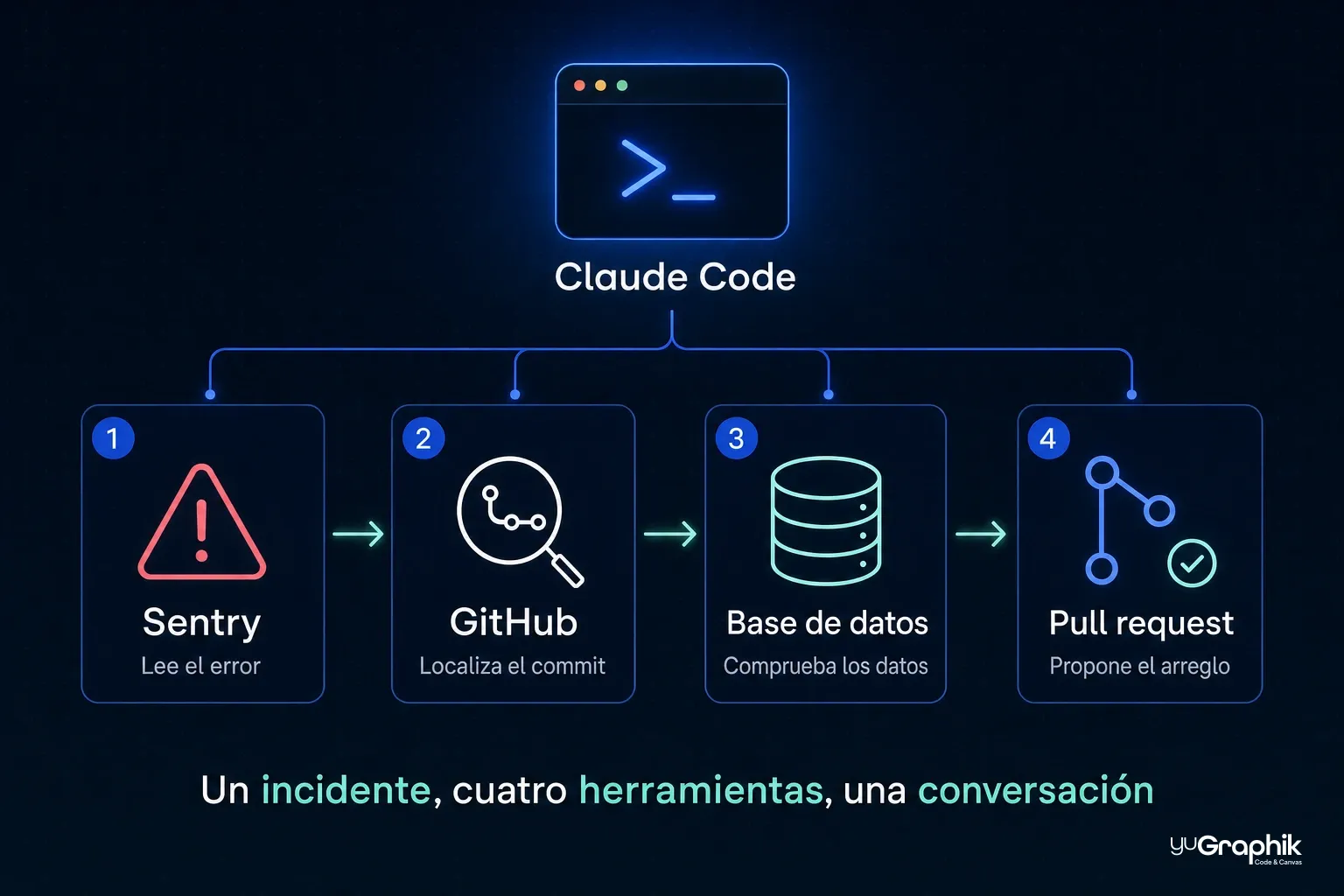
That chaining also works backwards in time: connected to Slack or the task manager, the assistant can dig up design decisions buried in threads from months ago and bring them in as context for the current problem. It's the famous "tribal knowledge" that's usually lost when someone leaves the team, turned into something you can query.
The Playwright case deserves a special mention, because it closes a loop: Claude Code doesn't just write your website's code — afterwards it opens it in a browser and checks that it works (the form submits, the menu unfolds, nothing breaks on mobile). It's the same principle we covered in the video with Remotion article: an assistant that reviews its own work is the difference between "it should work" and "I've verified that it works".
Skills and MCP: knowledge and hands
If you've read our previous articles you'll recognise skills: knowledge packages the assistant loads when it detects it needs them (Remotion's rules, your brand guidelines…). It's easy to confuse them with MCP because both "extend" the assistant, but they do different things and complement each other:
- A skill is knowledge. It teaches it how to do something: the rules, the best practices, the judgement. It doesn't grant new capabilities; it grants craft.
- An MCP server is hands. It gives it capabilities to act on external systems: read, write, execute. It doesn't teach judgement; it grants reach.
There's a third piece that completes the picture: the CLAUDE.md file, a document at the project root that Claude Code reads at the start of every session. It's the project's fixed memory: coding standards, build and test commands, the rules about what must not be touched (for example, "never read or modify credential files"). Skills (knowledge on demand), CLAUDE.md (always-present rules) and MCP (hands) are the three legs of the same stool.
The combination is where the magic is. An example from our own field: a skill with your brand guidelines teaches Claude which colours and typefaces to use, and Figma's MCP server lets it read the screen's actual design. With both, the request "implement the new page" comes out faithful to the design and consistent with the brand, without explaining anything twice.
Security: the price of giving AI hands
Connecting tools is granting power, and power has to be managed. Three practical rules we apply before connecting anything:
- Trusted servers only. An MCP server is code acting on your behalf. Use the official ones from each vendor or from proven providers, just as you wouldn't install a browser extension of dubious origin. Be especially careful with servers that read content from the internet: a malicious website could try to smuggle instructions to the assistant (so-called prompt injection).
- Minimum permissions. If the assistant only needs to read the database, connect it with a read-only user. If it only needs to check tasks, don't give it permission to delete them. Most services let you fine-tune this when authorising access.
- Review before approving. Claude Code governs every tool with a three-state policy: ask (requests your confirmation before executing), allow (runs without asking) or deny (total block). By default, actions that write, send or delete always ask; read-only ones can be relaxed. Keep that asymmetry: ten seconds of review prevent headaches.
For teams that want to go one step further, Claude Code supports hooks: small scripts of your own that run automatically before or after every tool use and can veto an operation that breaks company rules (accessing a protected path, skipping the linter…). It's a deterministic safety net —code, not probabilities— underneath the assistant's behaviour.
With those rules, the risk-benefit balance is clearly favourable: they're the same precautions you'd apply when giving access to a new collaborator.
When it's worth it (and when it's not)
| Situation | Is MCP worth it? |
|---|---|
| The assistant needs data that changes (tasks, orders, errors) | Yes, it's its natural terrain |
| Repetitive work across tools (code ↔ tasks ↔ documentation) | Yes, it saves the constant copy-paste |
| Checking the website actually works after every change | Yes, with a browser via Playwright |
| Implementing designs faithful to Figma | Yes, it reads the real measurements |
| A one-off query you can solve by pasting text into the chat | No need: paste it and move on |
| Giving it access "to everything, just in case" | No: connect what you use, with minimum permissions |
The rule we use: if you catch yourself copying information from a tool into the chat over and over, that tool is an MCP candidate. If it happens once a month, it's not.
What's coming: WebMCP, when your website also talks to agents
There's an emerging movement any business with a website should keep on its radar: WebMCP, a proposal for web pages themselves to expose tools to AI agents directly in the browser. Instead of an agent "looking at" your website and trying to guess where to click —a fragile, error-prone process—, the page declares in a structured way what can be done on it: search for a product, fill in the form, book an appointment.
The division of roles is clear: MCP connects the assistant to the systems behind the scenes (databases, APIs, repositories); WebMCP will do it up front, in the interface itself. It's still experimental technology, but the direction connects with something we already argued when talking about SEO for AI: websites no longer compete only for human readers, but also for being readable and operable by agents. Just as we prepare a website for Google today, tomorrow we'll prepare it so an assistant can complete a purchase on it without breaking anything.
Why it matters to us as an agency
At yuGraphik we use Claude Code daily for web development, and MCP is what turns the assistant into something more than a code generator: it lets it verify its work in a real browser, read designs exactly as they come out of Figma and touch the tools where the real work lives. It's the same idea we defend in SEO for AI or in video as code: the workflows that work aren't the most spectacular ones, but those built on open standards that can be repeated, versioned and shared with the team.
And there's a strategic reason to bet on MCP specifically: it's a standard, not a product. What you connect today doesn't lock you to a vendor; if you switch assistants tomorrow, your MCP servers still work.
Conclusion
MCP solves the missing link for AI assistants: the connection to the tools where real work happens. In Claude Code it starts with one command, is shared with the team in one file and is governed with permissions and confirmations. Start small —one connection, the one that saves you the most copy-paste—, check the result and keep adding.
If you'd like to explore how these workflows would fit your business —from the website to day-to-day automation—, let's talk.