It's the question we get most from clients arriving with an old website: do we rebuild it in WordPress or bet on something modern like Next.js? The honest answer is that it depends, but "it depends" doesn't help you decide. This article breaks down the criteria we use to recommend one technology or the other, updated with what's changed in 2026: WordPress 7.0 and Next.js 16 are the most ambitious versions both projects have shipped in years.
Quick comparison: WordPress vs Next.js in 2026
If you only have a minute, this table sums up the differences between Next.js and WordPress. In bold, the stronger option for each criterion:
| Criterion | WordPress 7.0 | Next.js 16 |
|---|---|---|
| Performance | Good, with continuous optimisation | Excellent out of the box |
| Content editing | Visual panel for anyone | Needs a headless CMS or MDX files |
| Security | Requires constant vigilance | Minimal attack surface |
| Initial cost | €2,000 – €8,000 | €3,000 – €12,000 |
| 3-year cost | Recurring maintenance that adds up | Significantly lower |
| SEO | Easy to manage, with technical baggage | Full control and clean HTML |
| Ready-made features | Thousands of plugins available | Everything built custom |
The rest of the article breaks down each row with real data and ranges from the projects we audit and develop.
What WordPress is and what Next.js is: two different philosophies
WordPress is a content management system (CMS) that has dominated the web for two decades: a visual admin panel, thousands of plugins and themes, and a huge ecosystem of professionals who know it. It works as a monolith: the same PHP server generates each page by querying a database on every visit.
Next.js is a development framework based on React. It's not a CMS: it's a way to build custom websites, where each component is programmed. The key architectural difference is that the heavy lifting happens at build time, not on every visit: pages are generated in advance and served from a CDN network. In exchange for more programming, the result is exactly what the project needs, with no dead weight.
What changed in 2026
WordPress 7.0 "Armstrong"
Released on 20 May 2026, it's the deepest update to the CMS in years:
- AI built into the core. The new WP AI Client centralises the connection to models like ChatGPT, Gemini or Claude: keys are configured once and all authorised plugins inherit them, instead of the fragmented ecosystem of AI plugins from before.
- Revamped panel with DataViews. The first serious modernisation of the admin since 2013: listings built in React, with instant filtering and saved views, without page reloads.
- Updated requirements. WordPress 7.0 drops support for PHP 7.2 and 7.3: the minimum is now PHP 7.4 and the official recommendation rises to PHP 8.3 or higher. It's a sign of where the next requirements are heading and a good moment to check which version your hosting is pinned to.
- Real-time collaboration falls through. Simultaneous Google Docs-style editing, the version's big promise, was pulled in final testing due to serious performance issues and postponed to 7.1.
Next.js 16
Released in late 2025 and consolidated in 2026 with version 16.2, it changes the framework's internal rules:
- Explicit caching with
use cache. No more unpredictable implicit caching: dynamic code now runs by default on every request, and what you want to cache is declared explicitly, with clear lifetimes (cacheLife). - Turbopack out of the box. The new bundler written in Rust replaces Webpack in development and production, with reloads up to 10 times faster and builds that take a fraction of the time.
- Partial Prerendering (PPR). A page can serve its static structure instantly from the CDN while the dynamic fragments (user session, cart) resolve in parallel. The best of static and dynamic in the same URL.
- More efficient navigation. Layout deduplication and incremental prefetching mean the browser only downloads the parts of each route it doesn't already have.
Performance: WordPress vs Next.js in numbers
There's no possible debate here: a Next.js site exported as static and served from a CDN loads in milliseconds, with no database or server processing each visit. Excellent Core Web Vitals come almost out of the box (if you want to understand what each metric measures and how to diagnose your site for free, we break it down in our practical Core Web Vitals guide).
WordPress can be fast, but it demands continuous work: caching plugins, image optimisation, good hosting and the discipline not to install unnecessary plugins. Most slow WordPress sites aren't slow because of WordPress, but because of the accumulation of layers no one reviews: page builders inject massive CSS and JavaScript that block rendering.
Industry comparisons in 2026 draw a consistent gap:
| Metric | Typical WordPress (with plugins) | Well-built Next.js |
|---|---|---|
| Initial load on mobile | 3 – 6 s | 0.5 – 2 s |
| LCP | 3.5 – 6 s | 1.5 – 2.5 s |
| PageSpeed score | 45 – 70 | 95 – 100 |
| Page weight | 2 – 5 MB | 100 – 300 KB |
| HTTP requests | 60 – 150 | 15 – 30 |
These are indicative ranges —a well-tended WordPress can get closer and a poorly built Next.js can get worse—, but they reflect what we see when auditing real sites: the starting point of each technology is very different.
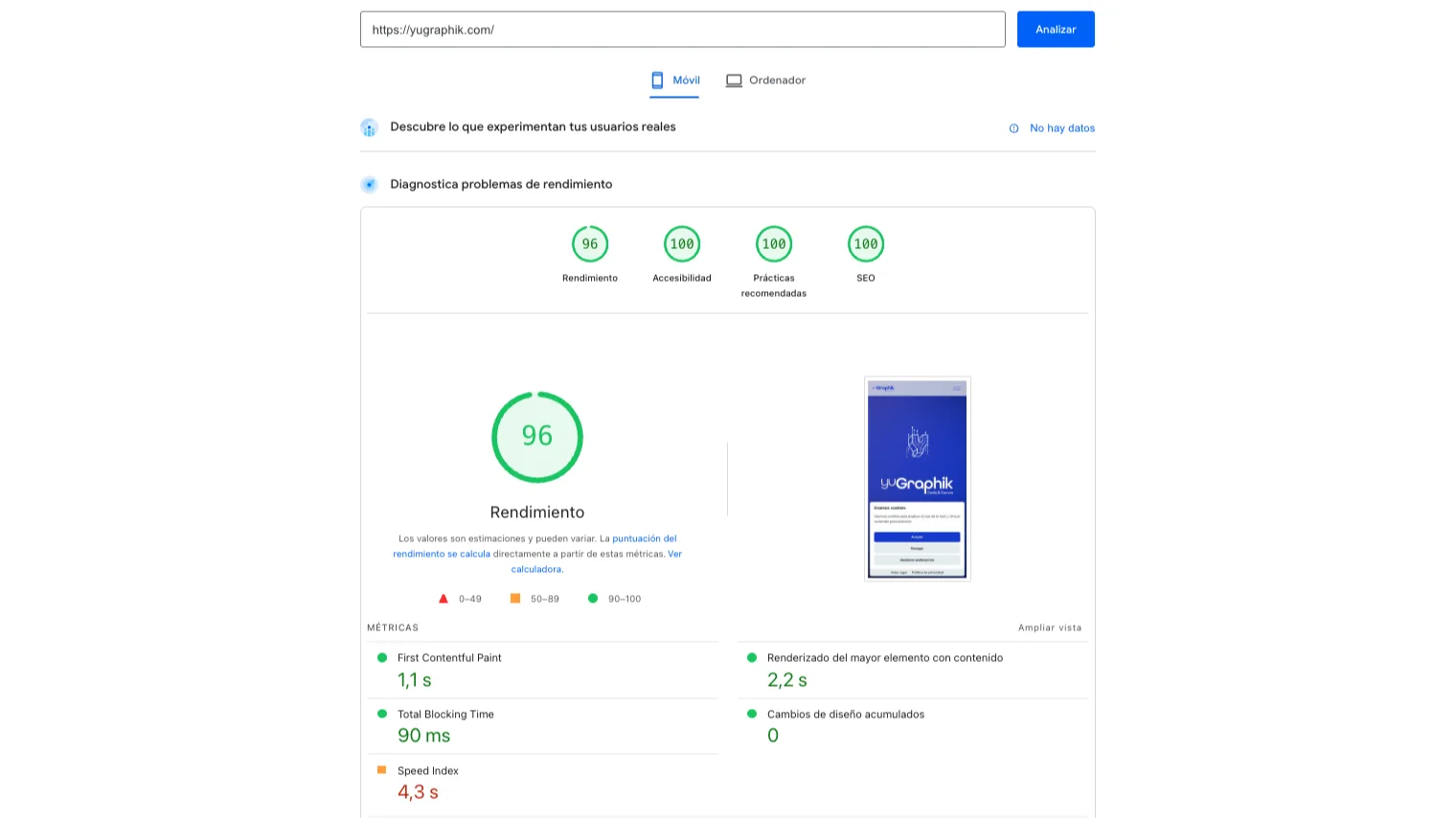
A measured figure, not a theoretical one: the homepage of this very site —Next.js 16 exported as static and served from a CDN— scores 96/100 in performance on mobile PageSpeed Insights, with an LCP of 2.2 seconds, a CLS of 0 and 100 in accessibility, best practices and SEO (measured June 2026). And we tell it with a confession included: days earlier the LCP read 6.6 seconds because the cookie banner, injected late by JavaScript, had become the largest element on screen on mobile. We diagnosed and fixed it the same day, precisely because in a static site there are few pieces to review. The moral applies to any technology: the architecture gives you the starting point, but only measuring keeps it.
Security and maintenance
A static site has practically no attack surface: there's no exposed login panel, no database, no outdated plugins. Dependencies are audited in the deployment process (npm audit in CI/CD) before publishing. Maintenance comes down to updating dependencies a few times a year.
WordPress, due to its popularity —it powers more than 40% of the web—, is the number-one target for bots and automated attacks: it systematically concentrates the vast majority of documented CMS intrusions. The weak point usually isn't the core (well maintained), but the plugin ecosystem: an average corporate install uses 20–30 plugins from different vendors, and each one is a potential door. On top of that comes the universal login path (/wp-admin), bombarded by brute force around the clock. With timely updates, backups and good hosting it's managed without problems, but it's a recurring task someone has to do (and budget for): forensic cleanup after a hack usually costs between €200 and €800.
Technical SEO
WordPress shines at content SEO: mature plugins let a writer with no technical background manage canonicals, sitemaps and metadata from visual interfaces. Its Achilles heel is technical SEO: legacy code, unused CSS from page builders and deep DOMs consume crawl budget and make life hard for bots.
Next.js flips the equation: it requires a developer who knows technical SEO, but in return it gives full programmatic control over every meta tag, Open Graph directives and structured data (JSON-LD). And because the HTML arrives fully rendered on the first request, crawlers don't suffer the indexing penalties typical of heavy JavaScript applications. In competitive sectors, where speed acts as a ranking tiebreaker, that architectural cleanliness makes a difference.
And for appearing in ChatGPT and Perplexity?
The question is no longer just how to rank in Google: more and more customers ask an AI assistant directly which product or service to choose. Generative engines largely feed on the same indexes as the classic search engine, but they especially reward fully rendered HTML, structured data and content with direct answers: exactly the strengths of an architecture like Next.js's. WordPress can be optimised just as well for this ground, although again through plugins and discipline. The specific techniques —llms.txt, structured data, answer formatting— are explained in our AI SEO guide.
Content editing
WordPress's big advantage: anyone can edit text, upload photos or publish an article from a visual panel, without touching code. With the revamped panel in version 7.0 and integrated AI, that editorial experience is better than ever today.
In Next.js there are two paths:
- File-based content (MDX): ideal for technical blogs and sites the agency updates. It's the system we use on this very blog.
- Headless CMS: WordPress, Strapi or similar as the content backend, with Next.js rendering the frontend. The client keeps their editing panel and the site keeps the performance of a static one.
Costs: the full picture over three years
WordPress is sold as the cheap option, and in initial investment it is: a corporate site starts at around €2,000–€8,000 leaning on templates and plugins. A custom Next.js build requires React and TypeScript profiles and usually starts at €3,000–€12,000.
But the picture changes when projected over three years:
| Factor (3-year horizon) | WordPress | Next.js |
|---|---|---|
| Initial development | €2,000 – €8,000 | €3,000 – €12,000 |
| Hosting | €600 – €1,200 (PHP + database) | €0 – €720 (CDN / Vercel) |
| Theme and plugin licences | €780 – €1,680 | €0 |
| Security (firewall, scans) | €300 – €600 | Built into the architecture |
| Technical maintenance | €900 – €1,800 | €0 – €900 |
There's also an uncomfortable factor worth saying out loud: a good part of the industry lives off WordPress's recurring maintenance. The monthly fees for "updating plugins and watching security" are a business model in themselves, and they explain why many clients are never offered alternatives that don't need it. A well-planned static site eliminates almost all those billable hours; we'd rather charge you for improving your site, not for keeping it alive.
A new factor: governance
Something that didn't enter these comparisons before and now does: platform risk. The conflict between Automattic (WordPress's parent company) and WP Engine, which escalated from 2024 with access blocks to the official repositories and legal battles still rumbling on in 2026, showed that a corporate decision can interrupt the security updates of millions of sites. It's not a reason to rule out WordPress, but it is a variable large companies already weigh when choosing infrastructure, and one of the pushes behind the rise of decoupled architectures.
Headless: the best of both worlds
When a project needs the performance of Next.js but the client doesn't want to give up the WordPress panel, the headless architecture is the answer, and in 2026 it's already a mature pattern, not an experiment:
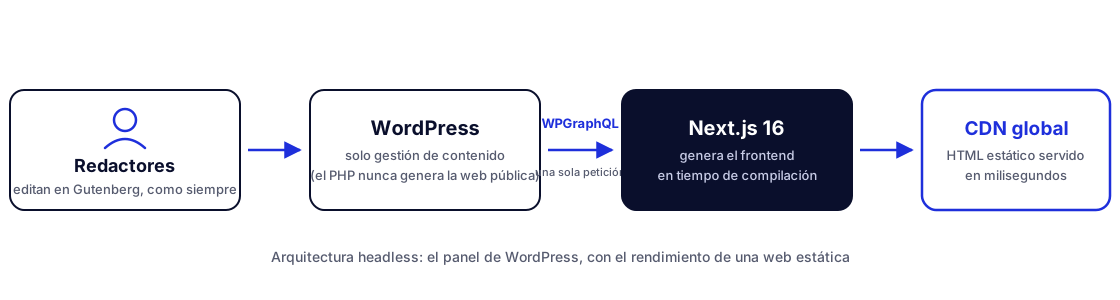
- WordPress is left with content management only: writers work in Gutenberg as always, but PHP never generates the public site.
- Next.js renders the frontend from Vercel or Cloudflare, querying the content at build time.
- WPGraphQL is the standard bridge: a single request brings the article, its author, its taxonomies and its custom fields (ACF), without the back-and-forth of the REST API.
- Block-to-component mapping translates each Gutenberg block into its equivalent React component, preserving the writer's visual freedom.
- Tools like Faust.js and WPGraphQL Smart Cache have solved the historical pain points: draft preview and cache invalidation on publish.
The price is an initial development significantly longer than either option on its own. It pays off when editorial volume and performance demands justify it at the same time.
How to migrate from WordPress to Next.js without losing rankings
It's the most repeated fear when the change comes up, and it's justified: a careless migration really can sink organic traffic. Well executed, it not only preserves it: the speed improvement usually pushes it up in the medium term. The process we follow:
- Complete URL inventory. The current site is crawled and, URL by URL, we decide what stays, what gets merged and what gets removed.
- 301 redirects for everything that changes. Each old URL must point to its new equivalent; removed ones, to the closest alternative. Never to the homepage en masse.
- Equivalent or better metadata and structured data. Titles, descriptions, Open Graph and JSON-LD are migrated, and along the way what was wrong gets fixed.
- New sitemap and verification in Search Console. The updated sitemap is submitted and crawl and indexing errors are watched during the first weeks.
- Measurement before and after. Core Web Vitals, positions and organic traffic of the key pages, to catch any drop in time and prove the improvement.
Our recommendation by project type
- Corporate site or portfolio: static Next.js. Maximum performance, minimal maintenance.
- Blog or site with daily publishing by the client: WordPress, or headless with Next.js if performance is the priority.
- Standard online shop: WooCommerce if the budget is tight; Next.js with an integrated gateway when the shop is the heart of the business.
- Business built on very specific plugins (courses with LearnDash, memberships with MemberPress, complex booking systems): monolithic WordPress; replicating those systems custom would cost a fortune.
- Sectors with sensitive data (health, finance, public administration): Next.js. Removing the exposed panel and the public database is security by design.
- Multilingual site with demanding SEO: Next.js. The fine control over hreflang, structured data and rendering is worth it.
Doesn't your case fit neatly into any box? That's usually how it is. In our web development service we start by auditing what you already have before recommending anything, and in our projects you can see both approaches working in production.
Conclusion: WordPress or Next.js?
There's no universal winning technology: there are projects. WordPress 7.0 remains an excellent tool for those editing content constantly, and its bet on native AI keeps it relevant; Next.js 16 is the best option when performance, security and maintenance cost rule, and its technical edge has widened this year. And when you need the best of both worlds, the headless architecture is no longer a risky bet: it's the industry consensus for projects that need speed and an editorial team working daily.
Frequently asked questions
Does a Next.js site rank better than a WordPress one?
Not automatically. Google rewards speed, content and structure, not the technology. What happens in practice is that a well-built Next.js site reaches excellent Core Web Vitals with less effort, whereas WordPress usually requires continuous optimisation of plugins, caching and hosting.
Can I edit the content myself if my site is built in Next.js?
Yes, by connecting a headless CMS or file-based content flows (like MDX). For content that changes daily, a visual CMS is still more comfortable; for corporate sites updated a few times a month, the file-based flow is usually enough and cheaper.
Does migrating from WordPress to Next.js lose rankings?
No, if the migration is done right: keeping the URLs (or redirecting with 301s), preserving metadata, structured data and sitemap. In fact, the speed improvement after migration usually has a positive effect on rankings in the medium term.
Which is cheaper to maintain?
A static Next.js site can be hosted for pennies a month on a CDN and doesn't need plugin security updates. WordPress requires hosting with PHP and a database, frequent updates and backups. For the same project, maintaining the static site is significantly lower.
What's new in WordPress 7.0?
WordPress 7.0 'Armstrong' (May 2026) integrates artificial intelligence into the core via the WP AI Client and modernises the admin panel with DataViews. It also drops support for PHP 7.2 and 7.3: the minimum is now PHP 7.4 and the recommended version becomes PHP 8.3 or higher. Real-time collaborative editing, its big promise, was pushed to version 7.1 due to performance issues.