In 2026, when someone is deciding what to build their website with and wants something more modern than the usual CMS, one of the names that comes up is Payload CMS. It's not a plugin or a template: it's a different way of understanding what a content management system is, designed from day one for people who build custom websites and applications. In Next.js vs WordPress we explain when a custom site is worth it; here we answer what comes next: what Payload is, how it works and how it differs from the rest of the options, from classic WordPress to other headless CMSs like Strapi or Sanity.
What Payload CMS is
Payload CMS is a content management system —a CMS, like WordPress— designed for developers. Its underlying difference boils down to two words: code-first. In most CMSs, to create a new section —say, a product catalogue— you click through options in a panel. In Payload, that structure is written directly in the project's code, and from there the system builds everything else on its own.
What does it build "on its own"? Three things:
- The admin panel, where editors write and upload content, with its visual look already in place.
- The store where the data is kept (the database).
- The connections that let your website —or a mobile app, or any other system— request that content and display it.
The word headless describes exactly that: Payload takes care of the content, but doesn't decide how it looks. You build the site's design separately, usually with Next.js —the technology behind many modern websites, this one included—. It's the opposite of WordPress's classic model, where the same system both stores the content and draws the page.
The game-changer arrived with Payload 3.0: it was the first CMS that installs inside the Next.js site itself, instead of running as a separate program. In practice, the panel, the data store and the public site live in a single project and ship together. The current version is 3.86, and Payload 4.0 is already in the works.
A note that brings some peace of mind about its future: Payload is free and open source —anyone can use and modify it, under the MIT license— and, since June 2025, is part of Figma, the well-known design tool. It's still free and you can host it wherever you want, but now with a large company behind it.
How it works under the hood
The best way to grasp it is to see how short it is to create a section. This snippet of code defines a blog posts section, with its title, body, author and date:
export const Posts = {
  slug: 'posts',
  fields: [
    { name: 'title', type: 'text', required: true },              // title
    { name: 'content', type: 'richText' },                        // article body
    { name: 'author', type: 'relationship', relationTo: 'users' }, // author
    { name: 'publishedAt', type: 'date' },                        // date
  ],
}
You don't need to understand every line; just take away the idea: with a few lines, Payload already knows how to build the panel form, save the data and make it available to the site. That definition is the "source of truth", and everything else is generated from it. If tomorrow you add a field, the panel and the store update themselves.
The pieces worth knowing, in plain terms:
- The database, your choice. Payload doesn't force you to use a specific technology to store the data: it works with the most common ones (it's database-agnostic: MongoDB, PostgreSQL or SQLite). Translation: you can use the one you already have or the one that fits best, without changing CMS.
- Users and permissions included. It ships with sign-up and login and very fine-grained control over who can see or edit each thing, down to a single field within a record.
- Image and file management, like a resource library. It uploads images and resizes them on its own, lets you organise them in folders, keep versions and search them by tags, with no need for extra programs or services.
- Automatic tasks. It can handle jobs that take time or repeat —sending emails, processing things overnight— without slowing the site down, something uncommon in CMSs of this kind.
- Content ready for any screen. It offers the content in several ways so a website, a mobile app or another system can consume it; and because it lives inside Next.js, the site can request it directly, no detours, and load faster.
Payload CMS vs WordPress: quick comparison
If you only have a minute, this table sums up the differences with the most widespread CMS. In bold, the stronger option for each criterion:
| Criterion | WordPress 7.0 | Payload CMS |
|---|---|---|
| Configuration model | Visual panel, no code | Structure in code (TypeScript) |
| Content editing | For anyone, from minute one | Comfortable panel, but you build it first |
| Performance | Good, with continuous optimisation | Excellent out of the box on Next.js |
| Security | Requires constant vigilance | Minimal attack surface |
| Language | PHP | End-to-end TypeScript |
| Ecosystem | Tens of thousands of plugins and themes | Young, growing |
| Learning curve (editor) | Minimal | Low, once configured |
| Learning curve (development) | Medium (PHP + ecosystem) | Needs React and TypeScript |
| Hosting | PHP + database | Node.js / serverless, or Payload Cloud |
The rest of the article breaks down the rows that weigh most in a real decision.
Two opposite philosophies
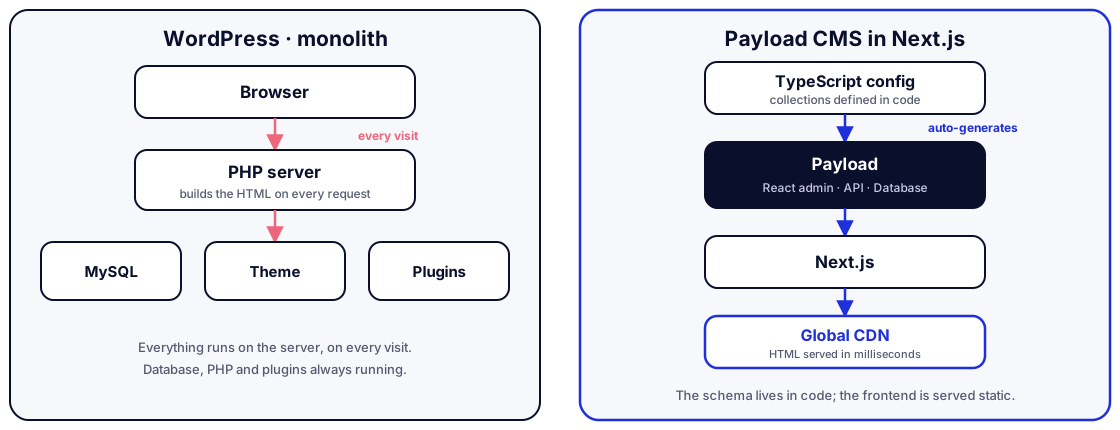
WordPress was born as a system for publishing without knowing how to code, and that's still where its strength lies. It's a monolith: the same PHP server stores the content in a MySQL database and generates the public page on every visit, relying on a theme and whatever plugins you have installed. Anyone can write an article, upload a photo or change a text from a visual panel without touching a line of code.
Payload flips the starting point. It assumes there's a developer building the site and gives them superpowers: define the content model in code and get in return a complete backend and an admin panel without writing them by hand. Content is separated from presentation, and the frontend —usually Next.js— decides how and when to show it, with the option of serving it ready-made from a CDN.
The consequence is direct: WordPress optimises the experience of whoever edits content; Payload optimises that of whoever builds the site. Almost every other difference stems from that original decision.
Content editing
Here WordPress keeps its historical edge. With the revamped panel in version 7.0, snappier lists and AI built into the core, the editorial experience is comfortable from minute one and requires nothing technical at all. For a client who publishes daily and wants full autonomy, it's hard to beat.
Payload isn't far behind, with one important nuance: its panel is also visual and pleasant to use, once a developer has configured it. The text editor, custom fields and reusable content blocks offer a modern, highly polished experience. The difference isn't in the editor's day-to-day, but in the starting point: in WordPress you install and start editing; in Payload someone prepares the content structure first.
Two recent pieces also bring that experience closer to a top-tier visual CMS. The text editor uses Lexical —Meta's editing technology—, which lets you embed interactive elements inside the text itself. And Live Preview lets the editor see the exact final design as they type, with no surprises between what they edit and what gets published.
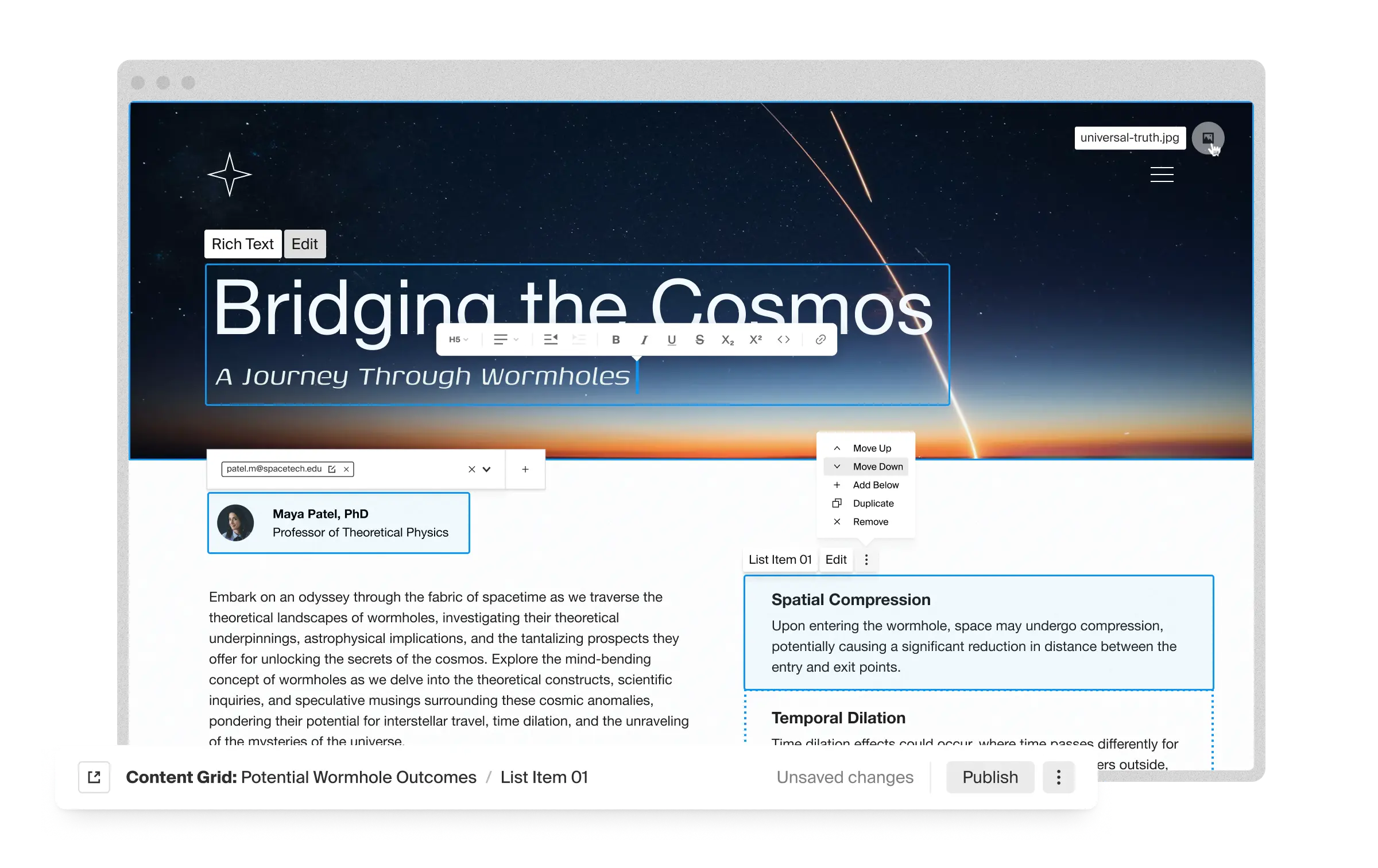
The screenshot sums up the difference well: the editor doesn't fill in fields blindly, but works on the final page, moving and editing blocks directly where they'll be seen.
Performance and security
On performance, Payload starts with Next.js's advantage: it can prepare pages ahead of time and serve them from the CDN, without running code or querying the database on every visit. Excellent Core Web Vitals come almost by default —we go into it in our practical Core Web Vitals guide—. WordPress can be fast, but it demands ongoing work: caching, image optimisation, plugin discipline and good hosting.
One data point illustrates the leap: in a documented migration of a WooCommerce store with over 15,000 products, product-page load times dropped 74% (from 4.2 to 1.1 seconds), the admin panel responded 85% faster and the conversion rate rose from 2.1% to 3.2%. These are figures from a single case, not a promise, but they point in the same direction as the theory.
The same happens with security. A site built with Payload and Next.js can publish its public part as ready-made pages, with no exposed login panel or externally accessible database. WordPress, being the most popular CMS in the world, concentrates most of the automated attacks against content managers, and its weak point is usually the third-party plugin ecosystem. It's not that WordPress is insecure, but that it demands recurring vigilance that someone has to do and budget for.
It's worth being fair both ways. In Payload's favour: it ships with access control, secure sessions and attempt limiting out of the box, no plugins. Against it: being code-first, you're the one who defines the rules of who can see what, and if you don't declare them you can leave a sensitive field exposed; and like any software, it isn't infallible —in early 2026 a security flaw was found and fixed, a reminder of the importance of configuring it carefully—. The advantage over the monolith isn't the absence of flaws, but a much smaller attack surface.
Ecosystem and maturity
And this is where WordPress hits back. Two decades of history translate into a colossal ecosystem: tens of thousands of plugins and themes, a huge community, tutorials for any question and professionals in every city. If you need a store, a booking system or an online campus, there's almost certainly a plugin that solves it today.
Payload is young by comparison. Its community grows fast and Figma's backing gives it stability, but there's no "plugin for everything": what in WordPress is install-and-configure, in Payload is often develop. For a technical team that's an advantage (full control, no third-party surprises); for someone looking to set up something standard without development, it's a cost.
Governance and sovereignty
There's a factor that didn't use to appear in these comparisons and now does: who controls the platform. WordPress's governance is highly centralised around Automattic and its co-founder, and the 2024 crisis with WP Engine —with access to the official plugin and update repository blocked— showed that a corporate dispute can affect millions of sites. With Payload, the entire configuration lives in your own project under the MIT license and you don't depend on a central repository to run or to update security: control over your site is total.
Payload versus other headless CMSs
WordPress is just one of the alternatives. If you've already decided you want a headless CMS, the relevant comparison is with the sector's other heavyweights: Strapi, Sanity and Contentful. Each solves the same problem differently.
| Criterion | Payload | Strapi | Sanity | Contentful |
|---|---|---|---|---|
| Configuration | Code (TypeScript) | Panel + code | In code | Panel (cloud) |
| Hosting | Your own or Payload Cloud | Your own | On the provider's cloud | On the provider's cloud |
| Database | MongoDB, PostgreSQL or SQLite | SQL only | Proprietary | Proprietary |
| Lives inside Next.js | Yes, natively | No, separate program | No | No |
| Cost | Free (MIT license) | Free (Community edition) | Paid per user | Paid, high-end |
| Data control | Total, on your server | Total | On the provider's servers | On the provider's servers |
- Strapi is the most direct open-source rival, but it keeps the classic model of two separate programs —the CMS on one side and the site on the other—, with the added slowness of having them talk to each other over the network. Payload avoids that hop by living inside Next.js. Also, Strapi only works with SQL databases, whereas Payload supports MongoDB too.
- Sanity is excellent for highly structured content and real-time teamwork, and it also defines content in code. The big difference is the model: it's a cloud service, your data lives on its servers and the bill grows per user and per usage. You host Payload yourself, so control of the data is yours —non-negotiable in healthcare, banking or public administration—. Sanity also makes you learn its own language to query data; Payload uses industry standards.
- Contentful is the option for large corporations: very powerful, but with a price and complexity that make it disproportionate for most projects.
- Lighter options like Keystatic store content as plain text files inside the project: perfect for documentation or simple blogs, but they fall short as soon as you need users, permissions or lots of interrelated data, where Payload plays in another league.
In short: against the paid services (Sanity, Contentful), Payload wins on control and cost; against Strapi, on Next.js integration; and against the simpler options, on power for real applications.
What changes with the Figma acquisition
Payload was announced as part of Figma at the Config 2025 conference, with its creator and CEO, James Mikrut, leading the project. For anyone evaluating it, what matters are the two guarantees that came with the announcement: new signups for the managed Payload Cloud hosting were paused —to focus resources on the Figma integration—, but the core's MIT license was reaffirmed, so the CMS remains free, modifiable and self-hostable with no strings attached.
The logic of the deal explains where the product is heading. Payload defines content in code, with a structure that closely resembles a design system; the bet is that the components and styles created in Figma translate almost automatically into content structure in Payload, bringing design and data closer together and cutting the eternal back-and-forth between whoever designs and whoever codes.
When to choose Payload
- Technical team that wants full control and end-to-end TypeScript: Payload. The code-based content model is a joy to develop and maintain.
- Non-technical client who publishes daily and wants autonomy: WordPress. Editing with no prior development is still its great asset.
- Custom site or app on Next.js that also needs a content panel: Payload. Living inside the same project, it avoids the glue between CMS and site.
- Project that leans on very specific ready-made functionality (memberships, courses, complex bookings): WordPress, unless you want to build those systems from scratch.
- Digital product, portal with fine-grained roles and permissions, or the backbone of an app: Payload. Its detailed access control is among the best on the market.
- Sectors with sensitive data (health, finance, government): Payload, for being able to remove the exposed panel and the public database, and for keeping the data on your own server.
And what about headless WordPress (using WordPress only as a content store and Next.js as the site)? It's a legitimate alternative, but there you still drag along two systems and two deployments; Payload unifies everything into a single project on Next.js. If you already live in the JavaScript ecosystem, that unification is its biggest argument.
Conclusion: is Payload CMS for you?
There's no universal winning technology, there are projects and profiles. Payload CMS shines when the person in charge is the one building: full control, end-to-end TypeScript, out-of-the-box performance and security, and a complete backend that lives inside your own Next.js app, with the data always under your control. Against WordPress it wins when the team is technical and performance matters; against the paid cloud CMSs (Sanity, Contentful), on control and cost; against Strapi, on Next.js integration.
Our way of deciding it is simple: we look at who will have their hands on the site day to day and how much the content weighs against custom functionality. In our web development service we start from that question before recommending anything, and in our projects you can see different approaches running in production.