Where should you deploy a Next.js website? The short answer: if the site can be exported as static, on any CDN — the decision is trivial and costs cents per month. If it needs a server, Vercel is the default option, Cloudflare the best price/performance, and AWS, Google Cloud and Azure the highest-control choices for those already operating on them.
This article unpacks that answer. In Next.js vs WordPress we explained when it makes sense to build a website with Next.js; the question that comes right after is where to host it, and there the noise is considerable: Vercel looks mandatory, AWS looks impossible, and every provider claims to be the obvious choice. We sort out the five serious alternatives of 2026 using the criteria we apply in our own projects, with the advantage of being able to show our own infrastructure as an example.
Before choosing a provider: does your site need a server?
Comparing providers is the second question. The first one —the one that actually decides price and complexity— is what your site needs in order to work:
- Static site. Every page is generated at build time (
output: 'export') and the result is HTML, CSS and JavaScript files. No server executes anything per visit: any CDN in the world knows how to serve files, so every provider works and you compete on price alone, which hovers around the symbolic. This is the case for most corporate websites, portfolios and blogs — including this one. - Server-rendered site. Some pages are generated on the fly (SSR), regenerated at intervals (ISR) or mix static and dynamic parts in the same URL (PPR, Next.js 16's Partial Prerendering). Here code does run on every visit, and the question changes: it's no longer "how much does it cost?" but "does this provider properly support the Next.js features I use?". The answer varies far more than the marketing suggests.
The usual trap is picking the second option out of inertia: many projects drag along SSR they don't need —a corporate site whose content changes twice a month doesn't need to generate anything per visit— and end up paying for servers, cold starts and complexity out of habit. Our advice before looking at providers: ask whether your site can be static. If the answer is yes, the hosting decision goes from strategic to trivial, and the Core Web Vitals come out nearly passing by default.
One name will come up several times: OpenNext, an open-source project that translates what next build produces into the format of other platforms (Cloudflare, AWS Lambda, Netlify). It's the piece that has changed the board in recent years: thanks to OpenNext, "full Next.js" no longer means "Vercel only".
The static export's fine print
The static route is the cheapest and most portable, but it's worth signing knowing what's in the clauses: with no server, everything generated at visit time disappears. Pages are built ahead of time when you publish, so every content change means regenerating the site —an automated process that takes minutes—, and what used to depend on a server is solved through other channels: redirects are configured on the CDN, images are optimized at publish time or via an external service, and multilingual routing is organized through the URL structure (/es/, /en/), just like this very site.
There's also a couple of plumbing adjustments nobody mentions until the first scare: a file store doesn't behave exactly like a web server, so you have to tell it how to resolve addresses when someone reloads an inner page —this site has that configuration enabled for precisely this reason— and what the browser may keep in its cache and for how long, so that publishing a new version doesn't break the site for whoever is browsing it at that moment.
None of this is a blocker: it's half an hour of well-documented configuration, done once and done for good. But it explains why "upload the files and you're done" is almost never literally the last step.
Vercel: the default option, for good reason
Vercel is the company that builds Next.js, and it shows: it's the only place where everything works with zero configuration. You connect the GitHub repository and every push deploys itself; every pull request gets a preview URL to review changes before going live; ISR, PPR, use cache, image optimization and streaming work out of the box, with no adapters and no fine print.
The good:
- Zero friction. From repository to production in minutes, with per-branch previews that change how teams review work.
- Guaranteed total compatibility. Every new Next.js feature works on Vercel the day it ships. On other platforms, adapters run weeks or months behind on the newest capabilities.
- A generous free tier for personal projects (the Hobby plan doesn't allow commercial use).
The less good:
- Pricing scales by usage and by seat. The Pro plan starts at about $20 per team member per month, and consumption is billed on top: bandwidth, function executions, image optimization. For a corporate website it's more than enough and predictable; on heavy-traffic projects the bill deserves watching — Vercel billing surprises are a genre of their own in the forums.
- Provider dependence. It's not a hostage situation —your Next.js code is yours and portable—, but the more you use its satellite services (analytics, feature flags, queues), the more moving out costs.
Who it's for: teams that want to spend their time on the product rather than infrastructure, projects using the latest framework features, and any server-rendered site where the cost of a DevOps engineer exceeds Vercel's premium — which covers most small and mid-sized businesses.
Cloudflare: the best price/performance of 2026
Cloudflare entered this battle from its home turf —the network— and in 2026 it's the most serious alternative to Vercel. Static sites are served for free from its global network, with no practical traffic limit. And for server-rendered sites, the official OpenNext adapter for Cloudflare runs Next.js on Workers, its distributed compute platform.
The good:
- Bandwidth isn't billed. That's the structural difference with almost everyone else: a traffic spike isn't a billing spike.
- Pricing from another league. The Workers paid plan starts at $5 a month, and the free tier sustains real projects, not just demos.
- A huge network: your site is served from hundreds of cities, with excellent latency on any continent.
The less good:
- Very good compatibility, not total. The OpenNext adapter covers SSR, ISR and the vast majority of features, but the framework's newest capabilities arrive with a delay, and the Workers runtime isn't pure Node.js: a dependency with exotic requirements may complain. On a normal website you won't notice; on a complex application, test before committing.
- The developer experience (previews, dashboard, logs) is decent but a step below Vercel's polish.
- The LaLiga blocks in Spain. Since 2025, LaLiga —Spain's football league— has been blocking Cloudflare IP addresses under a court order during match days to fight pirate streams. Because those IPs are shared, the blocks drag down thousands of legitimate websites that have nothing to do with piracy: shops, media outlets and corporate sites unreachable from several Spanish ISPs while the match lasts. Cloudflare is fighting it in court, but it keeps happening; if your audience is in Spain, it's a real risk to weigh.
Who it's for: projects with high or growing traffic where the bandwidth bill rules, static sites that want the best free CDN on the market, and teams with some technical muscle who'd rather pay $5 where others pay $200.
AWS: total control, sleeves rolled up
AWS is the world's most used cloud and offers not one but three ways to deploy Next.js, from less to more work:
- S3 + CloudFront, for static sites: the files are uploaded to an S3 bucket and CloudFront serves them as a global CDN. It's this very website's architecture, and we break it down below. Cost for a corporate site: cents per month.
- AWS Amplify Hosting, Amazon's "Vercel-style" option: connect the repository and it deploys itself, SSR support included. Less polished than Vercel and with less fine-grained compatibility, but reasonably comfortable.
- OpenNext + SST, for serious SSR: the adapter spreads Next.js across Lambda (functions), S3 (static assets) and CloudFront (CDN), all in your own account. Maximum control, maximum responsibility.
The good: absolute control of every piece (headers, caching, security, domains, certificates), raw infrastructure costs with no middleman, and natural integration if your backend already lives on AWS — forms with Lambda, email with SES, whatever you need.
The less good: AWS doesn't hold your hand. The learning curve is real, the console is a famously confusing maze, and initial setup time is measured in days, not minutes. The savings on the bill are paid for in engineering hours; if you don't have those in-house, the balance flips sign.
Who it's for: companies already operating on AWS, projects with fine-grained security or compliance requirements, and static sites managed by an agency that —like us— amortizes the setup across several projects.
Google Cloud: containers and scale to zero
Google Cloud's natural route for Next.js is Cloud Run: you package the application in a Docker container (Next.js makes it easy with output: 'standalone') and Cloud Run executes it, scaling from zero to thousands of instances with traffic. If nobody visits the site, you pay nothing; the price is an occasional cold start of a couple of seconds on the first visit after a quiet spell.
For those who prefer something more guided there's Firebase App Hosting, which understands Next.js out of the box: connect the repository and it assembles Cloud Run and Google's CDN underneath, Vercel-style. And for the purely static route, the veteran Firebase Hosting remains the ecosystem's shortcut: a single command publishes the site, and its configuration file handles URLs and redirects without wrestling any CDN.
The good: the container model is the most portable there is —that same Docker image runs on Azure, on a VPS or on your laptop—, scale-to-zero is ideal for projects with irregular traffic, and the bill is pure infrastructure.
The less good: by running Next.js "as is" in a container, the finer optimizations that depend on specialized infrastructure (distributed ISR, edge-served PPR) work in classic server mode, not at their best. And although less so than AWS, Google Cloud also demands craft.
Who it's for: teams already working with containers or in the Google ecosystem, applications with their own backend where Next.js is one piece among many, and projects that value portability over the framework's latest trick.
Azure: the option of the already-signed contract
Let's be frank: almost nobody chooses Azure for Next.js on the hosting's technical merits; it gets chosen because the company already lives in the Microsoft ecosystem and the contract, the approved vendor and the systems team are already there. And that's a perfectly valid reason.
The routes: Azure Static Web Apps for static sites (with a free tier and very well-solved GitHub Actions deployment, a legacy of GitHub being Microsoft's), and App Service or Container Apps for SSR, running Next.js as a Node application or a container. One detail better solved than most: routing, redirect and security rules are declared in a single configuration file, readable and versioned alongside the code. Server-rendered Next.js support, on the other hand, remains in preview with serious restrictions, so the reliable route for SSR on Azure is the container, with the same advantages and trade-offs as on Cloud Run.
Who it's for: organizations with Microsoft 365, Active Directory and a single-vendor policy. If that's not you, there are better options on this list.
Comparison: Next.js on Vercel, Cloudflare, AWS, Google Cloud and Azure
| Criterion | Vercel | Cloudflare | AWS | Google Cloud | Azure |
|---|---|---|---|---|---|
| Next.js compatibility | Total, out of the box | Very high (OpenNext) | High (OpenNext/Amplify) | Good (container) | Decent (container) |
| Static site | Free (Hobby, non-commercial) | Free, no practical limit | Cents/month | Cents/month | Free tier |
| Initial setup | Minutes | Hours | Days | Hours–days | Hours–days |
| Cost at high traffic | The highest | The lowest | Low | Low–medium | Medium |
| Bandwidth | Billed per GB | Free | Billed per GB | Billed per GB | Billed per GB |
| PR previews | Excellent | Good | Via Amplify | Manual | Via SWA |
| Lock-in risk | Medium | Low–medium | Low | Low (Docker) | Low (Docker) |
The honest reading of the table: Vercel wins on experience, Cloudflare on economics, and the three big clouds on control. There's no perfect column; there are different projects.
Real costs: two myths worth dismantling
Myth 1: "Vercel is expensive." For 90% of corporate websites, it isn't: at normal traffic, a single-seat Pro plan (about $240/year) comfortably covers a site that earns money through its digital presence, and it removes a cost that on the other clouds is invisible but real: the hours spent configuring and maintaining infrastructure. Vercel gets expensive in two specific scenarios: heavy bandwidth (video, weighty images, massive traffic) and large teams paying per seat.
Myth 2: "AWS is cheap." The bill is; the total cost, it depends. Our website costs cents per month in infrastructure, but behind it sit hours of CloudFront configuration, caching policies, security headers and a deployment pipeline that someone has to know how to build and maintain. We amortize that knowledge across projects; for a team with no AWS experience, those hours are worth more than years of Vercel's Pro plan.
To put numbers on bandwidth, which is where the bills truly diverge: overage on Vercel's Pro plan runs about $0.15 per GB; CloudFront charges $0.085/GB after a free terabyte per month — and internal S3-to-CloudFront transit isn't billed —; Google Cloud and Azure sit between $0.085 and $0.12/GB; and on Cloudflare the figure is simply zero. At corporate-website traffic, all of this is noise; serving terabytes of images or video, it's the difference between cents and a four-figure bill — to the point that some companies keep the application on their usual platform and move only the heavy assets to Cloudflare or Bunny.net.
Over a three-year horizon, for a static corporate site with moderate traffic, the real difference between providers is tens of euros per year — noise compared with what the development costs. The hosting decision only moves real money when there's a server involved, heavy traffic or a large team. That's where the table above matters.
How we do it: this website, on AWS
This very website you're reading is a static Next.js 16 export served from Amazon S3 with CloudFront as the CDN. Although we could host it for free on Vercel or Cloudflare, we chose AWS for three reasons that illustrate well when this route pays off:
- We already lived there. The site's contact forms are processed by a Lambda function behind API Gateway; adding the hosting to the same account simplifies domains, certificates and billing.
- Fine-grained control of headers. Being a static export, the security headers can't be configured from Next.js (that requires a server); on CloudFront they're defined in a Response Headers Policy attached to the distribution: HSTS,
X-Content-Type-Options,X-Frame-Options,Referrer-Policyand a Content-Security-Policy tuned to the exact origins the site uses. That level of control is precisely what managed platforms abstract away. - The cost is symbolic. S3 storage plus CloudFront traffic for a corporate website: cents per month, literally.
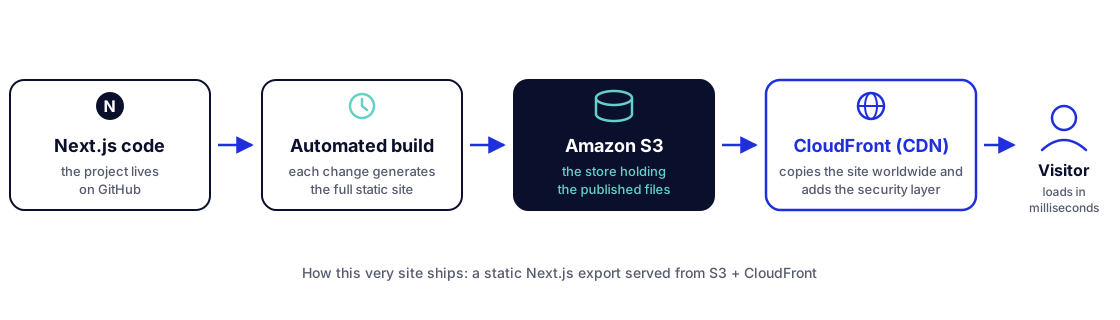
Does the result show? The numbers say yes: 96/100 mobile performance on PageSpeed Insights with an LCP of 2.2 seconds — the full figures, confession of error included, are in Next.js vs WordPress. Though the honest part is admitting that a well-built static site would have scored similarly on any of the five providers: the architecture weighs more than the CDN's logo.
And the generalizable moral: we chose AWS because we already had the knowledge and the account. Had that not been the case, this site would be on Cloudflare or Vercel and we wouldn't have lost anything that matters.
Hosting isn't everything: external services that complete the stack
Choosing where the site is served solves only part of the project. As soon as there are users, forms or media content, needs appear that hosting doesn't cover: a database, transactional email, optimized images, knowing what breaks in production. The modern way to solve them isn't hiring a bigger server but composing specialized services, almost all with free tiers — and with a property that fits this article's thesis: they connect via URL and API key, so they work exactly the same from Vercel as from a container on Cloud Run, and they don't tie you to any hosting provider.
The ones we reach for most often in Next.js projects:
| Service | What it solves | When to add it |
|---|---|---|
| Supabase | Managed Postgres with authentication, file storage and realtime APIs | When the site goes from showcase to application: users, data, login |
| Neon | Serverless Postgres that scales to zero, with database branches per environment | When you only need the database, without the rest of the bundle |
| Bunny.net | CDN, storage and image optimization at rock-bottom prices, from a company based in Europe | When you serve lots of images or video and the host's optimization gets expensive |
| Resend | Transactional email: contact forms, confirmations, notifications | The moment the site sends its first email — mail from your own server is a one-way ticket to spam |
| Upstash | Serverless Redis and queues, billed per request | Caches, rate limits and background jobs without managing a Redis server |
| Sentry | Production error monitoring, with the exact context of every failure | From day one on any server-rendered site; on a static one, optional |
| Plausible / Umami | Lightweight, cookie-free web analytics | When you want to measure visits without a consent banner and without giving the data away |
Two nuances from having assembled a few of these puzzles. First: every free piece is a potential bill and one more vendor to manage — add services when the project asks for them, not as a collector; a static corporate website needs none of the table, except perhaps the analytics. Second, in the opposite direction: these services are precisely what lets you keep the site static or nearly static for longer — a form wired to Resend or a search backed by Supabase doesn't force you to turn the whole site into a server-rendered application, and that well-defended boundary is what keeps hosting in the cents-per-month box.
Our recommendation by project type
- Corporate website, portfolio or blog (static): any of the five works; Cloudflare if you want the best free tier, AWS if you already operate there. It's a decision worth cents: don't spend more than an afternoon on it.
- Application with users, SSR and a small team: Vercel. The premium pays for itself in development time not lost.
- Project with high or growing traffic: Cloudflare. Free bandwidth changes the project's economics (with the caveat of the LaLiga blocks if your audience is mostly in Spain).
- Company already operating on AWS, Google Cloud or Azure: its own cloud, with OpenNext (AWS), a container on Cloud Run (Google) or a container on App Service (Azure). Operational coherence is worth more than marginal convenience.
- Zero budget and a personal project: Cloudflare, or Vercel's Hobby plan (remembering the latter doesn't allow commercial use).
- Maximum portability as a requirement: a Docker container (
output: 'standalone') from day one; it will run the same on any cloud and any VPS.
Your project doesn't fit cleanly into any box? That's normal. In our web development service, infrastructure is part of the conversation from day one, because the best deployment is the one decided before the first line of code is written.
Conclusion: architecture decides, the provider executes
If there's one idea to take away from this article, it's that "where do I deploy Next.js?" is answered in two steps. First, the architecture: if your site can be static, the decision is trivial and extremely cheap, and any of the five providers will serve it fast and well. Second, only if a server is involved: Vercel buys time, Cloudflare buys margin, and AWS, Google Cloud and Azure buy control — each with its own bill, in euros or in hours.
What we don't recommend is deciding out of inertia or fear: Vercel isn't a mandatory toll, AWS isn't forbidden territory, and the trendy provider guarantees nothing. It's a project decision, like the framework or the CMS. If you'd like us to make it with you —or to audit what you already have deployed—, let's talk.