
Almost every company that has been through a visual identity project has brand guidelines. They usually come as a forty- or sixty-page PDF with the palette, the typefaces, the logo rules and, with luck, a chapter on tone. And almost all of them share the same problem: nobody opens it. Neither does AI. When you ask an assistant for a banner, a LinkedIn post or a blog article, it makes up a blue that looks a bit like yours, picks some typeface and writes in that neutral voice that sounds like every brand at once.
The answer isn't to paste the PDF into every conversation, but to turn the guidelines into a brand skill. In this article we explain how to build one with Claude Code using simple instructions, without writing a line of code. You'll also see what it should include (design, icons, backgrounds and tone), how to share it so the whole team always has the latest version, and what works today in Claude, ChatGPT and Gemini.
What a brand skill is, in two minutes
Think of the sheet you would give a new designer or copywriter on their first day: these are our colours, this is the logo, this is how we talk and this is what we never do. A brand skill is exactly that, but for AI. It is a folder of instructions and files that the assistant checks on its own whenever you ask for something for your brand.
Three things make it especially useful for brand guidelines:
- It activates by itself. You don't have to remind it to use your identity. If you ask for an Instagram post for your brand, the brand skill kicks in.
- It reads only what it needs. For a banner it checks the colours and the logo; for an article, the voice guide. So you can put all your guidelines in it without overloading the assistant.
- It is a standard format. Anthropic published it in 2025 as an open standard, Agent Skills, and today Claude, ChatGPT and Gemini all understand it. The same skill works in all three.
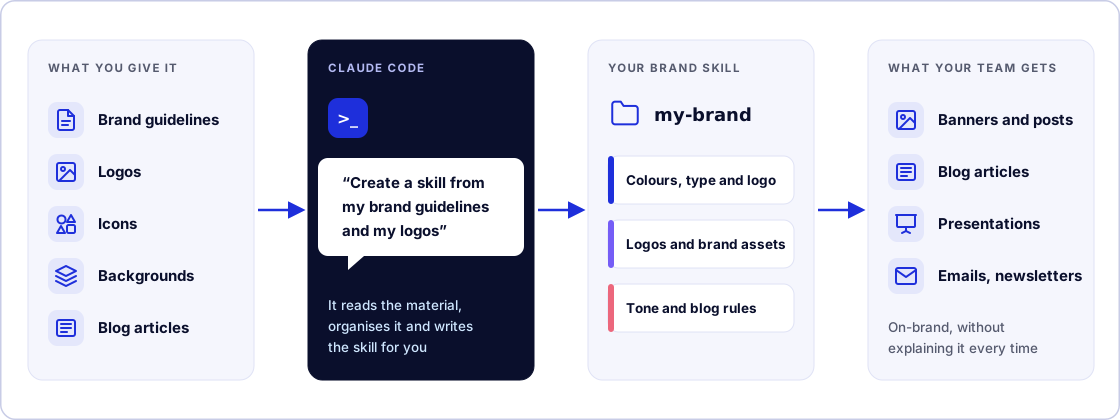
Unlike a Gemini Gem or a ChatGPT Project, a brand skill doesn't live locked away somewhere you have to open: it works in any conversation. And if you have read our article on MCP, remember the difference: a skill is knowledge (it teaches judgement) and MCP is hands (it lets the assistant use other tools).
What it's for: one example per role
The best way to see why a brand skill is useful is to look at what changes in the day-to-day work of each person on the team. Everyone asks AI for different things, but they all need the same: for the result to look like the brand without having to explain it every time.
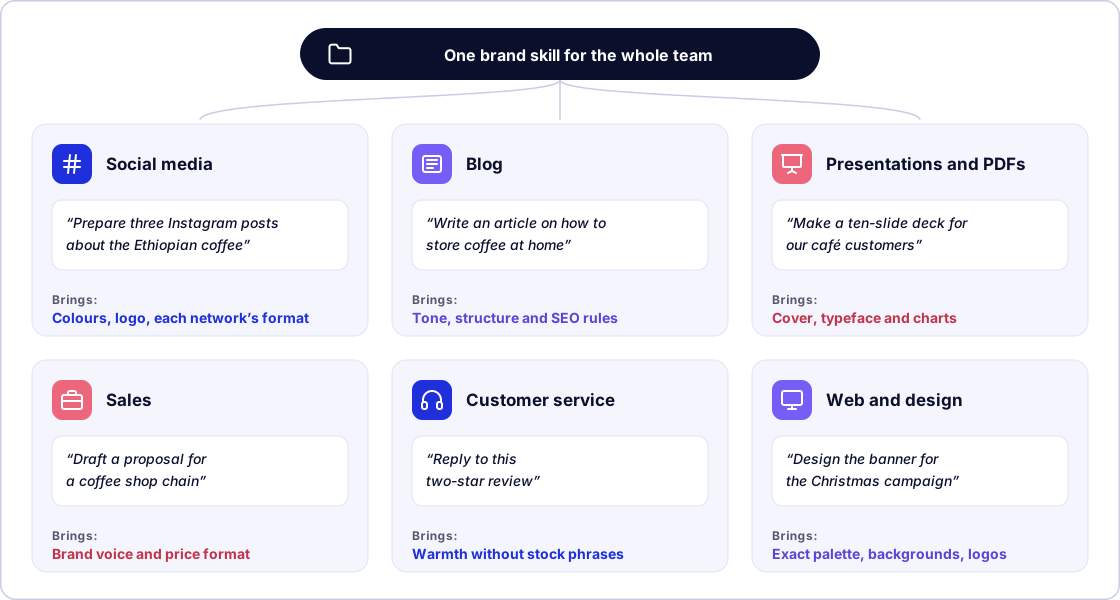
We'll stick with the example of My Brand, an online speciality coffee shop that will accompany us throughout the article.
Whoever runs social media
They ask "Prepare three Instagram posts announcing the new Ethiopian coffee". Without the brand skill, each post comes out with a different palette and that generic advertising tone you can spot a mile off. With it, the assistant uses the brand colours and the logo version that suits each background, writes in the house voice and knows which emojis and hashtags you use and which you don't. If you also tell it the formats for each network (portrait for Instagram, landscape for LinkedIn), it sticks to them without anyone reminding it. And when social media is handled by two people, or by an outside agency, everyone's posts look alike.
Whoever writes for the blog
They ask "Write an article on how to store coffee at home". The skill gives them the tone, the structure your articles follow (how they open, how often there is a subheading, how they close), the banned phrases and the SEO rules: a title of 60 characters at most, a meta description of 155 and links to other articles on the blog. The writer stops correcting the same things in every draft and spends their time on what AI doesn't know: experience, your own data and the house's opinions.
Whoever prepares presentations and PDF documents
They ask "Make a ten-slide deck for the meeting with cafés" or "Turn this report into a PDF with our branding". Claude can create the PowerPoint file or the PDF directly, and the skill makes sure it comes out with the approved cover and background, the house typeface, the logo in its place and charts in the brand colours. It is the difference between a deck that obviously came from AI and one that looks like it came from the design team. A practical tip: if you are sending it outside the company, ask for the PDF version too, which keeps the typeface even if the recipient's computer doesn't have it installed.
Sales and customer service
The sales team asks "Draft a proposal for a coffee shop chain", and the skill makes sure it sounds like the brand, that prices follow the house format and that the signature and contact details are right. Whoever handles customers asks "Reply to this two-star review", and the answer comes out warm, free of stock phrases and in line with the guidelines you have agreed for complaints. These are texts that never go through marketing and yet are just as much the brand.
Design and web
For whoever designs or codes, the skill is the source of exact values: colour codes, typeface, backgrounds and logos, ready for a campaign page, a banner or the newsletter template. No more asking which blue is the right one or hunting for the white logo in a shared folder.
The same goes for HR writing a job advert, or management preparing an announcement. The key is that brand judgement no longer depends on who makes the request. What the design team used to review over and over is sorted from the first draft.
Why create it with Claude Code
Claude Code is Anthropic's assistant that works directly with the files on your computer. That makes it the ideal tool for this job: it can read the guidelines PDF, copy the logos where they belong, organise the information into files and, when you are done, put the skill on GitHub so you can share it. You just tell it what you want, as in a chat.
You don't need to know how to use the terminal. In the Claude desktop app, in the Code tab, you choose the folder you want to work with and start typing. If you are comfortable with the terminal, the result is the same. You need a paid Claude plan (Pro or above).
Step by step: create your brand skill with Claude Code
The whole process fits in four steps, and none of them involves writing code:
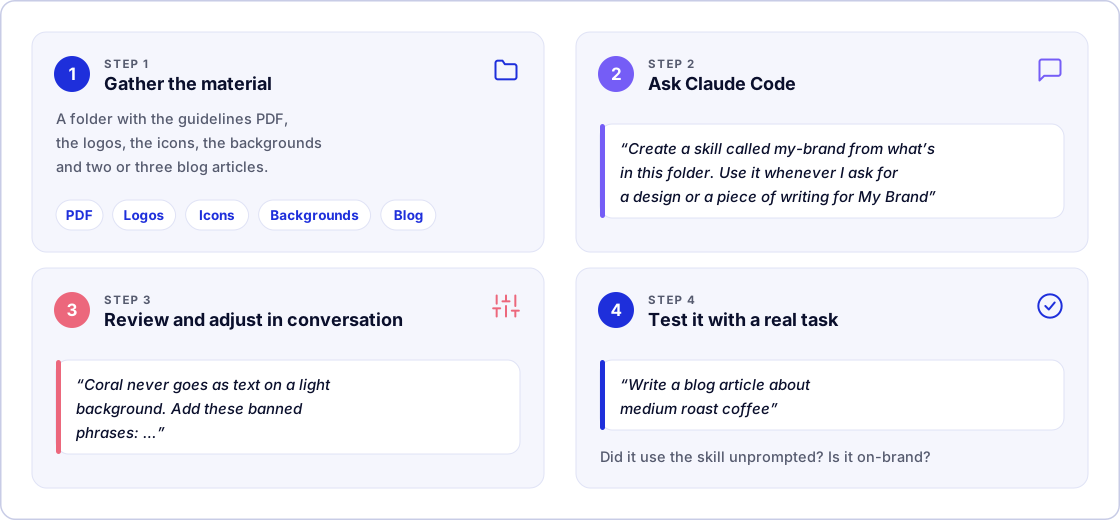
The examples stick with My Brand; replace its name with yours.
1. Gather the material in a folder
Create a folder on your computer and put everything that defines your brand in it:
- The brand guidelines, as a PDF. If they are out of date or incomplete, that's fine: you can fill in the gaps later.
- The logos in all their versions (colour, white and the symbol on its own), ideally as SVG or PNG.
- Your own icons, or the name of the set you use.
- The approved backgrounds and textures.
- The typeface, if its licence allows it to be shared, as Google Fonts licences do. If not, its name is enough.
- Two or three blog articles and a post or two that represent the brand well. A good example teaches more than ten rules.
- What you don't want: banned colours, phrases you can't stand, mistakes that keep coming back.
2. Ask Claude Code
Open Claude Code in that folder and write something like this:
Create a personal skill called my-brand from what's in this folder: the
brand guidelines, the logos, the icons, the backgrounds and the blog
articles. I want you to use it whenever I ask for a design or a piece of
writing for My Brand. Include the colours with their codes, the typeface,
how to use the logo, the icons, the backgrounds and the tone of voice,
with a special section on writing blog articles. Copy the logos and
backgrounds into the skill and, when you're done, give me a summary of
what you've created.
"Personal" means it will be available in all your projects. Claude Code will read the guidelines, pull out the key values, organise them into several files and copy the resources. It will ask for permission before creating or changing files: accept. When it finishes, it will explain what it has done.
We tried it. With fictional guidelines for My Brand, Claude Code created the brand skill from that single instruction:
- the five colours with their codes and a contrast table already worked out;
- the typeface, the logo usage and the icons;
- the backgrounds, with the recipe to reproduce them on a website;
- a blog section with a template and a checklist.
It also flagged what was missing (the guidelines mentioned a symbol and a texture that weren't in the folder) and marked as a "recommendation" anything it had added on its own. Then, in a new conversation, we asked for a blog article for My Brand without naming the skill. It used the skill unprompted: it addressed the reader directly, explained what a French press is and suggested a 148-character meta description.
An optional helper. Anthropic publishes an official add-on for creating skills, skill-creator, which asks you questions before writing the skill and then tests it. To install it, type
/plugin install skill-creator@claude-plugins-officialin Claude Code and, from then on, start your request with "Use skill-creator to…".
3. Review and adjust in conversation
The first draft is never perfect, especially if your guidelines describe with adjectives what AI needs as exact values. Start by asking it to show you what it has understood:
Summarise in a table the colours, the logo usage and the tone rules
you've included in the skill.
Then correct it with simple instructions, one per message if you like. These are adjustments that are often needed:
- "Coral is for details only: never as text on a light background."
- "Work out the contrast of each colour combination and note in the skill which ones can be used for text."
- "On photos, always use the white logo with a dark layer at 60 %."
- "Make an inventory of the logos, icons and backgrounds, saying when each one should be used."
- "Add these banned phrases: 'in today's fast-paced world', 'without a doubt', 'end-to-end solutions'."
The beauty of doing it this way is that you don't need to know how the skill is organised inside. Claude Code puts each thing in its place.
4. Test it with real tasks
Open a new conversation, so the assistant can't lean on what you have just told it, and give it three tasks like the ones your team would:
- "Make me an Instagram post announcing our new Ethiopian coffee."
- "Write a blog article about what medium roast means."
- "Draft this month's newsletter with the shop's news."
Check whether it uses the right colours and logo version, whether it respects the tone and whether it avoids the banned phrases. The difference usually jumps out:
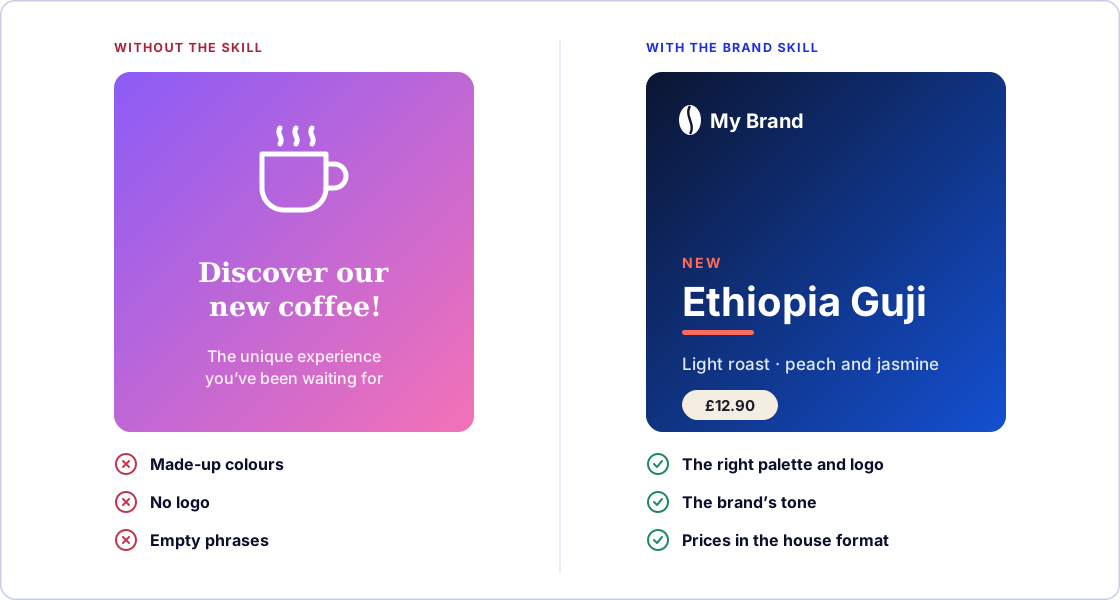
If it didn't use it for one of the tasks, just say so: "You didn't use the brand skill for this request. Adjust it so it activates whenever I ask for anything for My Brand." The problem is almost always the description the assistant reads to decide when to use it, and Claude Code knows how to fix it.
What your brand skill needs to know
Claude Code does the work of organising it, but you decide the content. These are the four areas worth insisting on.
Design: exact values, not adjectives
AI doesn't know what "an approachable, trustworthy blue" is, but it knows exactly what #1450d2 is. Everything that is a description in your guidelines has to end up as a value: the code of each colour and what it is used for, the typeface and its weights, the logo's minimum size, its clear space and what must never be done with it. Ask Claude Code to check the colour contrasts, because it is exactly the kind of detail an assistant won't review on its own initiative, and it prevents unreadable text.
Icons and backgrounds: the approved ones, with usage instructions
Icons and backgrounds are the first things an assistant improvises, and where it shows most that a piece isn't on-brand. If you use a well-known set such as Lucide, naming it and giving its rules is enough: stroke width, corners and allowed colours. If they are your own, they should go inside the skill with names that say what they are, together with an inventory: what each file is and when to use it ("dark gradient for covers", "paper texture for social media"). That way the assistant picks the right resource instead of guessing. Keep the files light: logos as SVG and photos at the size they will be used.
Tone, especially for the blog
The chapter on tone is the one that shows most and, oddly, the one that tends to be worst written in brand guidelines: three adjectives ("approachable, professional, innovative") that would fit any company. For AI to write like your brand, you need far more detail:
- Voice and form of address. Formal or informal? Do you speak as "we"? Short sentences or long ones? Is there humour?
- Vocabulary. The house words and the banned ones. For example, "customers" rather than "users".
- Banned phrases. The fillers that give away generic copy: "in today's fast-paced world", "in the digital age", "without a doubt", "discover how". Listing them works far better than asking for something that "doesn't sound like AI".
- Article structure. How a post on your blog starts, how often there is a subheading, whether it opens with key points or ends with frequently asked questions, and how it closes.
- SEO rules. Length of the title and the meta description, where the keyword goes, how many internal links and how image alt text is written. We cover it in depth in our technical SEO guide and our guide to SEO for AI.
- Formatting. How you write numbers (£2,000, 12 %), dates and headings.
- Before-and-after examples. An off-brand paragraph next to the same paragraph rewritten. For example, from "In today's fast-paced world, sustainability matters more than ever. Discover our end-to-end solutions" to "Since March, all our packaging is recyclable. Here's what changes for you and what it costs".
You can also ask for all of that in a single instruction:
Add a guide to the skill for writing on the blog: we address the reader
as "you", keep sentences short and explain technical terms the first
time they appear. Banned: "in today's fast-paced world", "without a
doubt" and "solutions". The first paragraph answers the question in the
title, there's a subheading every 300 to 400 words, the title stays
under 60 characters and the meta description under 155. Use the articles
in the blog folder as models.
What else you can include in your brand skill
Colours, logo, icons, backgrounds and tone are the foundation, but a brand skill can hold much more. The rule for deciding is simple: anything someone on the team would have to ask before making a piece. Because the skill only reads the part it needs for each task, adding information doesn't make it slower or more confusing. Use this list to check what you are missing:
Strategy and context
- Who you are talking to, what problem you solve and what sets you apart from the competition
- Your personality, mission and values, and also what the brand is not ("we are not a luxury brand")
- Sub-brands or product lines, with how their colours or tone differ
Language and copy
- A glossary with the official name of each product and how it is written (capitals, accents, trademarks)
- The approved slogans and key messages, so the AI doesn't invent new ones
- The tone for each situation: a campaign, a reply to a complaint, a delay notice, a job advert
- The fixed copy: the "about us" in short and long versions, the email signature, opening hours and social media links
- Languages: which variant you use, which languages you translate into and what is never translated
Imagery and formats
- The photography style (light, framing, whether people appear, retouching) and the approved photos, with instructions for generating AI images in that style
- The size of each format (posts and stories for each network, banners, A4 for documents) and your PowerPoint or Canva templates, if you have them
- How charts and figures are presented: colours, order and decimals
- For video, the intro and outro, the music and the subtitle style
- Accessibility rules: minimum contrast, text size and how to write alt text
Rules and limits
- The legal notices that must always appear (allergens, competition terms, data protection) and what must never be promised
- How your logo sits alongside a client's or a partner's
Process
- A checklist the AI runs through before delivering any piece
- When it should ask and whom ("if it's a new campaign, check with the brand manager")
- A log of brand changes, so it knows the old logo is no longer valid
What is best left out
- Passwords, access keys and customer data. The skill gets copied to many places and is no place for anything confidential.
- Data that changes often, such as prices, stock or promotions. If you write them into the skill, they will go stale. It is better to say where to look them up, or to connect the assistant to your catalogue through MCP.
To add any of these blocks, ask Claude Code as before, with the material to hand:
Add to the my-brand skill a glossary with the official names of our
coffees (they're in catalogue.pdf), the tone for replying to complaints
and the sizes of Instagram and LinkedIn posts. And before delivering
any piece, have it run through a checklist of the most important
brand points.
You don't need all of it from day one. If you have to choose where to go next, start with the glossary, the tone for each situation, the size of each format and photography: they are the gaps that cause the most mistakes.
Share it with your team so it updates itself
A brand skill that only lives on your computer helps you. For the whole team to work with the same version, and for every change to reach them without lifting a finger, it needs to live somewhere shared.
Put it on GitHub (Claude Code does it for you)
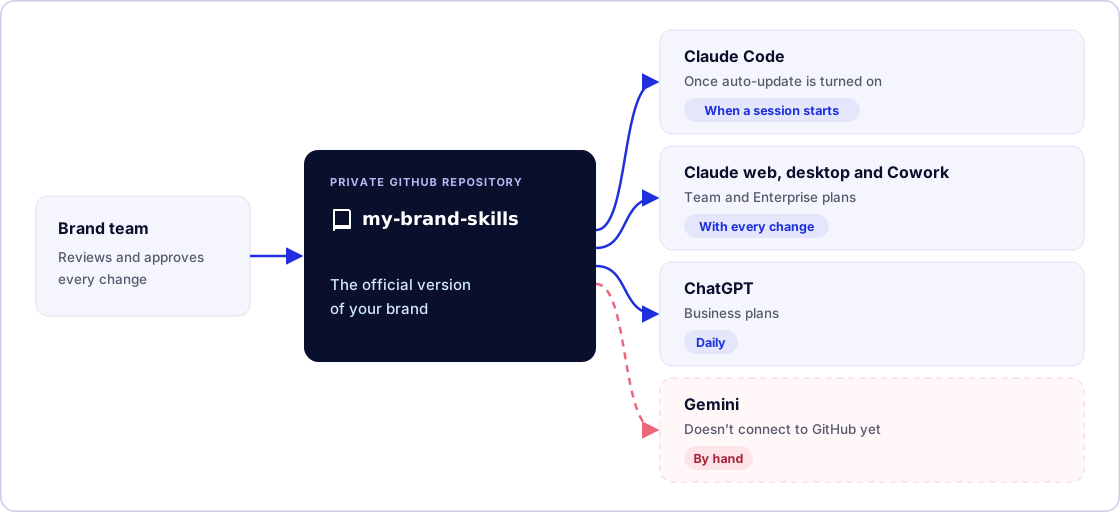
For our purposes, GitHub is a shared folder with a history: it keeps every version, shows who changed what and lets you review changes before they go out. It is also the place Claude and ChatGPT know how to read from to update themselves. All you need is a GitHub account. If the GitHub tool isn't connected on your computer, Claude Code will walk you through it. Then ask:
Get the my-brand skill ready to share with my team: put it in a private
GitHub repository called my-brand-skills, organised as a plugin
marketplace so that Claude, Claude Code and ChatGPT can install and
update it.
"Plugin marketplace" is simply the catalogue format those tools understand; Claude Code knows how to set it up. From then on, whenever you want to change something about the brand, you ask Claude Code and tell it to push the change. And if you don't want anything published without the brand owner seeing it, ask it to set up the repository so changes go through review.
Connect it to each tool
In Claude (web, desktop and Cowork). Team and Enterprise plans have the most convenient option: organisation sync. An account owner goes to Organization settings → Plugins & skills → Add → Sync from GitHub, picks the repository and leaves Sync automatically on. From then on, every change reaches the whole company, and the owner decides whether the skill is available, installed for everyone or required. Members don't need a GitHub account, and because whatever is installed on the Claude account also reaches Claude Code, Claude Code users get it too.
On an individual plan you can connect it to your account under Customize → Plugins → Add → Add marketplace, also turning on Sync automatically. And if you'd rather not use GitHub, you can always upload the skill as a .zip under Customize → Skills and share it, although each change will mean uploading it again.
In Claude Code. Each person can install it by typing /plugin marketplace add my-company/my-brand-skills and then /plugin install my-brand@my-brand-skills. To have it reach everyone who works on a project automatically, ask Claude Code: "Set up this project so that everyone who opens it has the brand skill from my-company/my-brand-skills." One important detail: auto-update is off by default. You turn it on once in /plugin, under Marketplaces, by choosing the catalogue and the Enable auto-update option.
In ChatGPT. It uses the same skills format, generally available since July 2026 on its business plans (Business, Enterprise, Edu and Healthcare), according to OpenAI's help centre. It is reaching personal plans in phases. The interesting part for a team arrived at the end of August: the admin can import the GitHub repository under Admin → Plugins → Add → Import marketplace, and it accepts the same format as Claude, so nothing needs changing. ChatGPT checks for changes every day, and the Sync now button forces an update straight away.
In Gemini. It is the latest to arrive. Skills are already on personal Google accounts, and on 17 November 2026 Gems become skills; they will reach Workspace in March 2027. You create one by uploading the skill's main file (SKILL.md), and to add the other files you upload the whole folder with the Replace skill option. It has three limits for a team: it doesn't connect to GitHub, it can't be shared yet and it only accepts text, PDFs and images, so the typeface doesn't travel. Each brand change means uploading it again by hand, and the practical approach is to have one person look after it.
What works in each tool
| Claude Code | Claude web, desktop and Cowork | ChatGPT | Gemini | |
|---|---|---|---|---|
| Understands the brand skill | Yes | Yes | Yes | Yes |
| Connects to GitHub | Yes | Yes | Yes, in the business workspace | No |
| Updates itself | Yes, once auto-update is on | Yes, with every change | Yes, daily | No, uploaded by hand |
| Can be shared | Yes | Yes | Yes | Not yet |
| Plan needed | Pro or above | Skills, all (Free included). Organisation sync, Team and Enterprise | Business, Enterprise, Edu and Healthcare; personal, in phases | Personal accounts; Workspace from March 2027 |
Data as of November 2026. All four tools are changing very quickly in this area, so check their help pages before you decide.
If you are going to use the same brand skill in several tools, ask Claude Code for one last check: "Make sure the skill follows the open Agent Skills standard so it also works in claude.ai, ChatGPT and Gemini." There are small format details that Claude Code accepts and claude.ai rejects on upload, and this saves you from them.
Common mistakes
- Accepting the first draft. Always check what it has understood. Brand guidelines tend to be vague exactly where AI needs precision.
- Adjectives instead of values. "Corporate blue" isn't a colour;
#1450d2is. - Logos without instructions. If there are five versions and none says when it is used, the assistant will pick at random.
- Forgetting the tone. It is what shows most on the blog and what gets the least care.
- Testing it in the same conversation where you created it. Everything works there, because the assistant remembers what you told it. The real test is a new conversation.
- No owner. If nobody reviews the changes, the brand skill goes stale just as the PDF did.
A word on security: treat it like any internal document. A private repository, reviewed changes and no passwords or customer data inside. The other way round, only install skills from sources you trust, because they are instructions the AI follows.
Why it matters to an agency
At yuGraphik we treat brand guidelines as a system, not a PDF. When we deliver a visual identity, the colours, typeface and tone end up as templates, as code and, more and more, as a brand skill. That is what lets our videos made with code, for example, come out with the right branding without checking them frame by frame.
And the reason to do it in a standard format is the same one we made for MCP: what you build today doesn't tie you to one vendor. If your team switches assistants tomorrow, the brand skill goes with it.
Conclusion
Brand guidelines nobody reads don't protect the brand. Turned into a brand skill, they apply themselves every time someone on the team asks AI for a design or a piece of writing. And building one no longer takes technical knowledge: gather your material, ask Claude Code, review it in conversation and test it with three real tasks. Then put it on GitHub and let the sync do the rest.
If you'd like help turning your identity into a brand skill, or creating that identity from scratch, let's talk.
Frequently asked questions
What is a brand skill?
It is your brand guidelines in a format AI can actually read: a folder of instructions and files (colours with their exact codes, typefaces, logo usage, icons, backgrounds and tone of voice) that the assistant checks on its own whenever you ask for a design or a piece of writing for your brand. That way you don't have to explain the identity in every conversation.
Who in the company can benefit from a brand skill?
Anyone who asks AI for designs or writing. Whoever runs social media gets posts with the brand's colours, logo and voice; whoever writes for the blog gets the tone, structure and SEO rules; whoever prepares presentations or PDF documents gets the cover, typeface and chart colours. So do the sales team with their proposals, customer service with replies to reviews and emails, and whoever designs or builds the website, who has the exact values to hand. The advantage is that brand judgement no longer depends on who makes the request.
What information should a brand skill include?
As a foundation, the colours with their codes, the typeface, logo usage, icons, backgrounds and tone of voice, with specific rules for the blog. From there, anything someone on the team would have to ask before making a piece: the audience and value proposition, a glossary of official product names, the tone for each situation, the fixed copy (about us, signature, contact details), the photography style, the size of each format, legal notices and a final checklist. What is best left out is passwords, customer data and data that changes often, such as prices.
Do I need to know how to code to create a brand skill?
No. With Claude Code, you just gather the material in a folder and ask for it in a sentence, for example: “Create a skill called my-brand from what's in this folder and use it whenever I ask for a design or a piece of writing for my brand.” Claude Code reads the guidelines, organises the information, copies the logos and writes the skill. Then you refine it in conversation, as you would with a person.
Does the same brand skill work in Claude, ChatGPT and Gemini?
Yes. All three use the same format, an open standard called Agent Skills, so the same brand skill works in all of them. What changes is how each one installs and updates it: Claude and ChatGPT can connect to GitHub and receive changes automatically, while in Gemini, for now, you upload it again by hand.
How do I get the brand skill to update itself for the whole team?
By keeping it in a private GitHub repository, which Claude Code can create for you, and connecting each tool to it. In Claude for teams, changes reach the whole organisation every time the repository is updated, Claude Code included. In ChatGPT for business, the admin imports the repository and it syncs daily. In Claude Code you can turn on auto-update.
Which plan do I need in each tool?
To create it with Claude Code you need a paid Claude plan (Pro or above). To use it: in Claude, skills are on every plan, including the free one, and GitHub sync for the whole organisation is on Team and Enterprise. In ChatGPT they are on the business plans (Business, Enterprise, Edu and Healthcare) and are reaching personal plans in phases. In Gemini they are on personal Google accounts and will reach Workspace in March 2027.
How is a brand skill different from a Gem or a ChatGPT Project?
A Gem or a Project keeps instructions inside one tool, and you have to open it for them to count. A brand skill activates by itself in any conversation when the task matches, reads only the part it needs and works across tools. In fact, Google is turning Gems into skills.
Can I just give Claude the PDF of my brand guidelines?
Yes, and it is the best starting point: Claude Code reads the PDF and turns it into clear rules. What matters is checking afterwards what it has understood, because guidelines tend to describe with adjectives what AI needs as exact values, and filling in whatever is missing (banned phrases, tone examples, blog rules) in conversation.
Is it safe to share a brand skill with the team?
Yes, with the same precautions as any internal document: a private repository, changes reviewed before they go out and no passwords or customer data inside the skill. And the other way round: only install skills from sources you trust, because a skill is a set of instructions the AI follows.


